Migration
Migrate for Compute Engine (MFCE)
- MFCE 4
- For Azure, AWS
- Steps
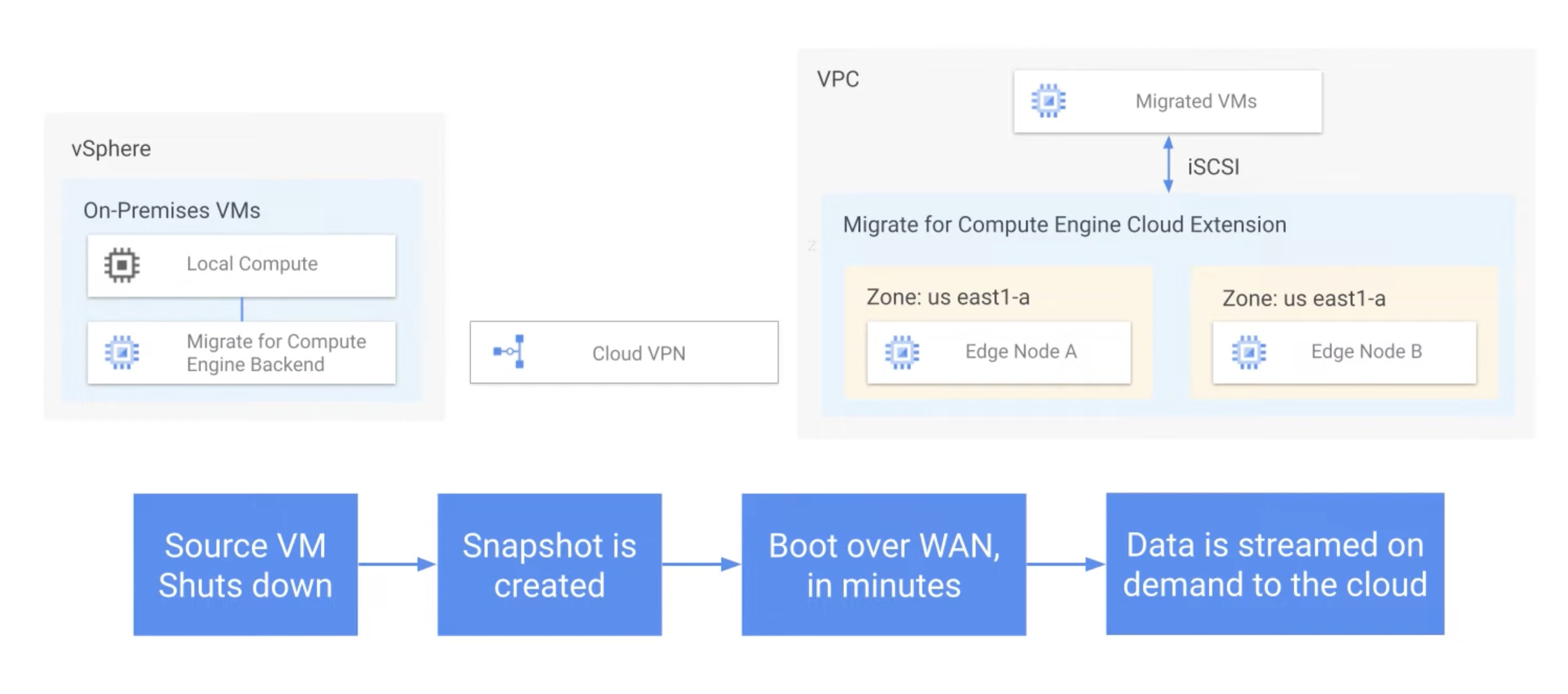
- MFCE 5
- offer a simpler and more powerful way of migrating VMWare (only)
- Managed service, No longer needs to deploy by Google Marketplace
- done by using replication, not streaming
- No more Cloud Extension/edge nodes
- No agent is needed on the migrated VMs (agentless migration)
- Minimum connectivity requirements (can be performed over HTTPS 443)
- Cloud VPN or Cloud Interconnect is no longer required (but still supported)
- Architecture
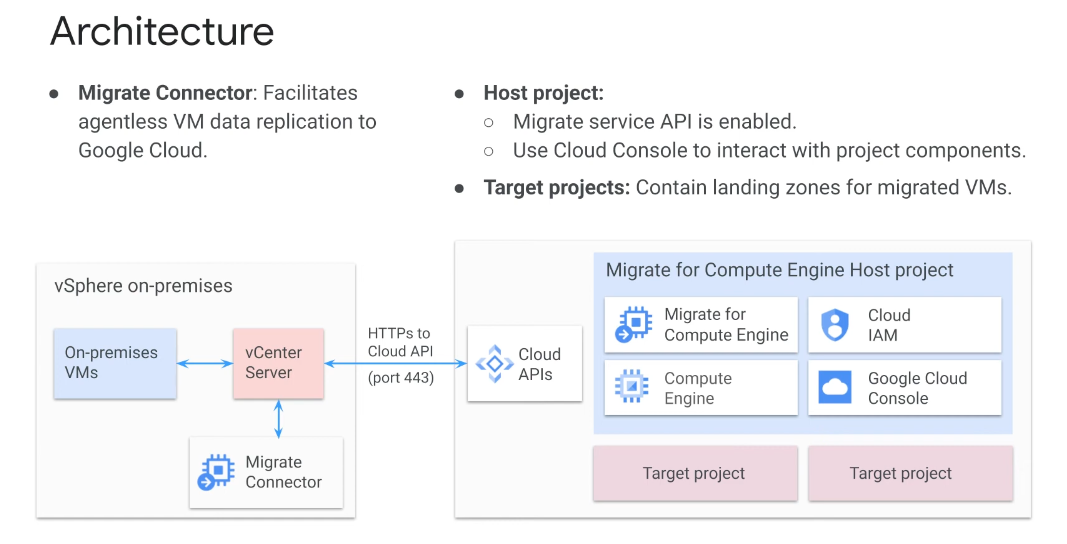
- Process
- Setup VPN + Network tags
- Create GCP roles and service accounts
- Deploy migrate for Compute Engine Manager
- Configure source environment
- Deploy Cloud Extension
- Test clone only available for 1 copy per instance at a time
- Offline migration
- Enables you to migrate workloads with the (typically) legacy operating systems that are not currently supported by Migrate for Compute Engine
- Can also be used for "storage-only migration"
- Steps
- Source VM shutdown
- Storage migrates completely to Cloud Extension
- Storage is being detached from Cloud Extension to Persistent Disk
- Migrated VM starts at GCP
- Migration wave
- Components
- Wave - A construct for batch migration of VMs
- Runbook - The spec file describing the source VM in the wave along with the Target specification per each VM
- Wave job - Migration jobs ( Test clone, Full Migration, Detach, Cleanup)
- Choosing
- Business Criticality
- Lifecycle Environment
- Uptime Sensitivity
- Licensing and Compliance
- Dependencies
- Components
Migrate for Anthos
- Move & Convert workloads into containerized deployments on Google Cloud
- Workloads can start as physical servers or VMs
- Move workload compute to container immediately (<10 mins)
- Data can be migrated all at once or "steamed" to the cloud until the app is live in the cloud
- Steps
- Configure processing cluster
- Create GKE cluster
- Install
Migrate for Anthoswith command ->migctl setup install
- Add migration source
- Migrate from Compute Engine use command ->
migctl source create ce my-ce-src --project my-project --zone zone - Need to install an additional package for another provider
- Migrate from Compute Engine use command ->
- Generate and review the plan
migctl migration create test --source my-ce-src --vm-id my-id --intent Image- Intent can be Image, Image and Data, Data, or PB-based container
- The output is yaml file that can be further customized
- Generate artifacts
migctl migration generate-artifacts my-migration- Copy files and directories representing the VM to a Container Image Registry as an image
- Migration for Anthos creates two images, a runnable image for deployment into another cluster, and a non-runnable image layer for updating the container image
- Generate the yaml file for deploying the VM into the GKE cluster
- Test
- Deploy
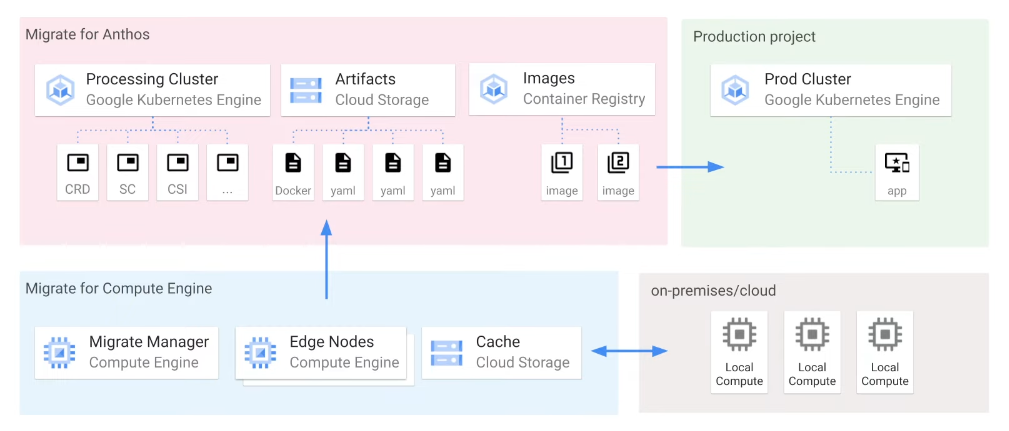
- Configure processing cluster
Database Migration Service
- Lift and shift for database service
Cloud Datastream
- Change data capture and replication to synchronize your data across databases, storage systems, and applications
- Low latency, and won't bog down your source database
- Integrate with BigQuery, Cloud Spanner, Dataflow, and Data Fusion