Storage
S3
- Use cases
- Backup
- Disaster Recovery
- Archive
- Hybrid Cloud Storage
- Application hosting
- Media hosting
- Data lakes & big data analytics
- Software delivery
- Static website
- Globally unique name, Looks like a global service but is created in a region
- Naming
- No uppercase, No underscore
- 3-63 characters long
- Not an IP
- Must start with a lowercase letter or number
- Must NOT start with the prefix
xn-- - Must NOT start with the suffix
-s3alias
- Objects
- Key (Prefix + Object name)
- There's no concept of the directory within buckets (the UI will trick you think)
- Max object size is 5TB
- If uploading more than 5GB, must use "multi-part upload"
- Versioning
- Protect against unintended deletes
- The same key overwrite will change the version
- Enabled at the bucket level
- Suspending versioning does not delete the previous version
- Lifecycle Rules
- Transition Action: move objects between storage classes
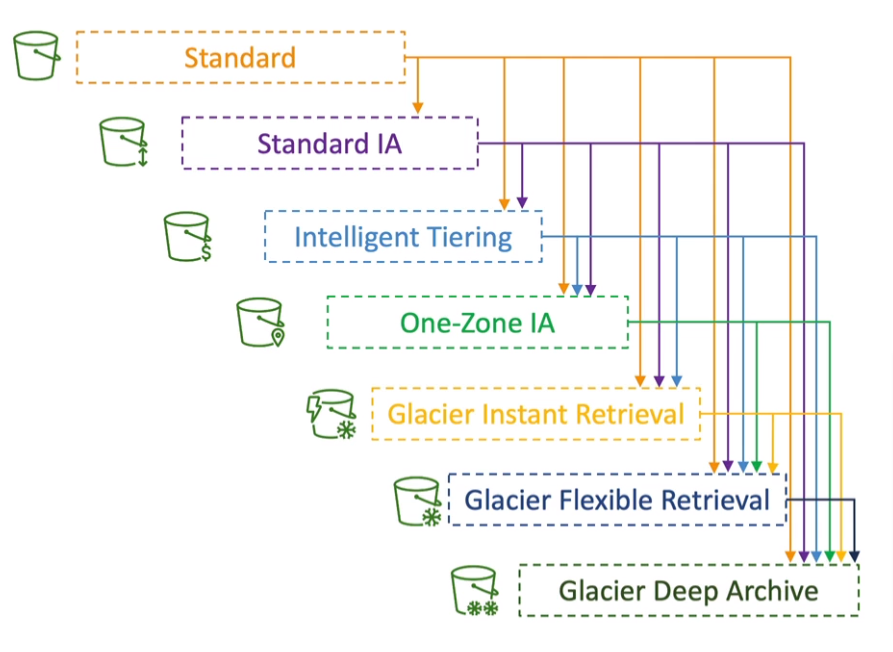
- Expiration Action: expire (delete) object after some time
- Rules
- can be created for a certain prefix
- can be created for certain objects Tags
- Transition Action: move objects between storage classes
- Analysis
- Recommendations for Stand and Standard IA
- NOT work for One Zone IA or Glacier
- The report is updated daily
- 24-48 hours to start seeing data analysis
- Requester Pays
- The requester must be authenticated in AWS
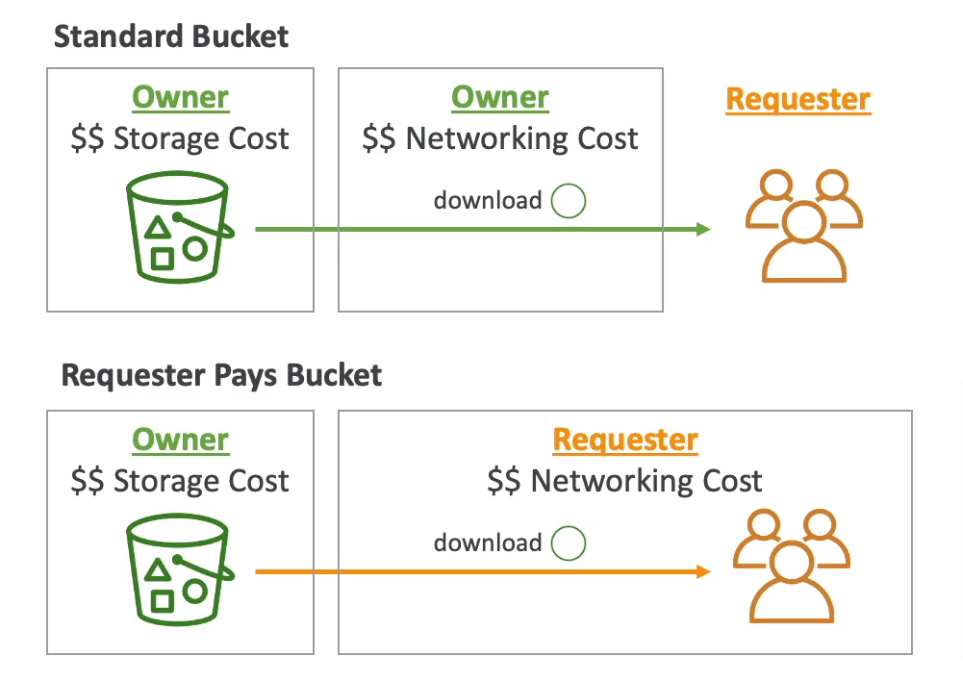
- The requester must be authenticated in AWS
- Event Notifications
- S3:ObjectCreated, S3:ObjectRemoved, S3:ObjectRestore, S3:Replication ...
- Support filtering (*.jpg)
- Typically deliver events in seconds but can sometimes take a minute or longer
- Deliver to: SNS, SQS, Lambda Function, Event Bridge
- Performance
- S3 Automatically scales to high request rates, a latency of 100-200 ms
- At least 3500 PUT/COPY/POST/DELETE or 5500 GET/HEAD requests per second per prefixes in a bucket
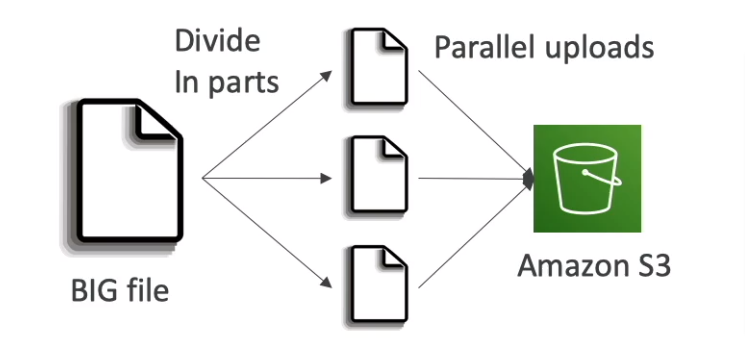
- Multi-Part Upload (recommend for >100MB, Must use for >5GB)
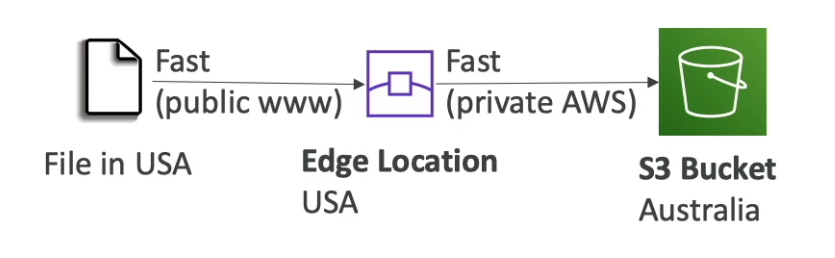
- S3 Transfer Acceleration
- Increase transfer speed by transferring files to an AWS edge location
- Compatible with multi-part upload
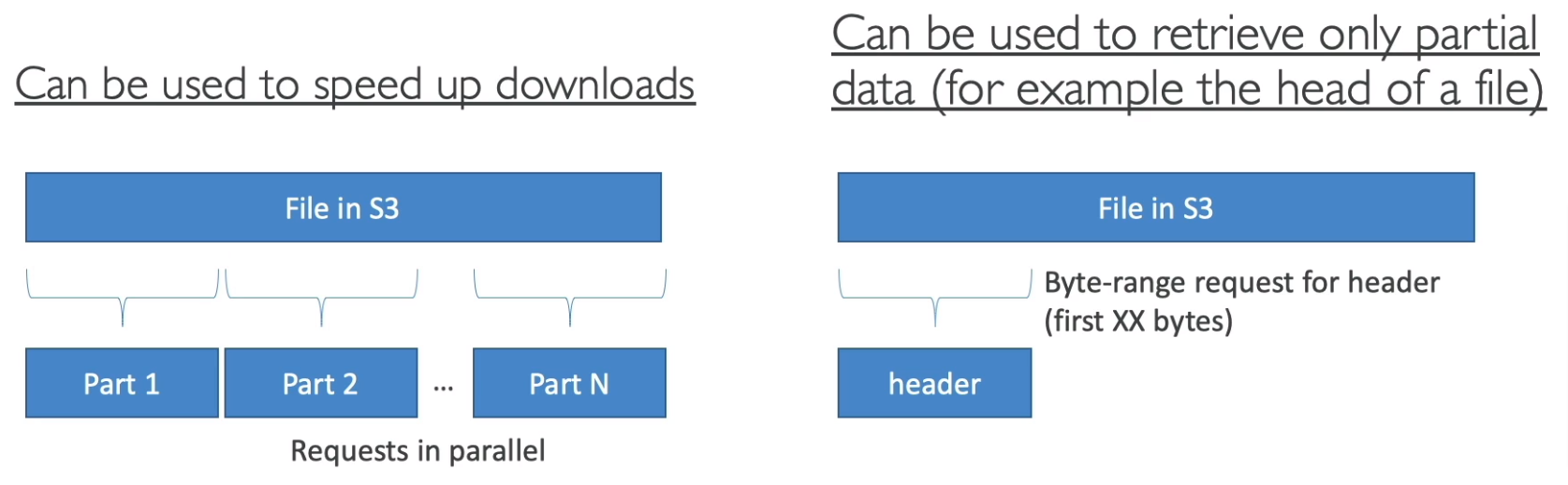
- S3 Byte-Range Fetches
- Parallelize GETs by requesting specific byte ranges
- Better resilience in case of failures
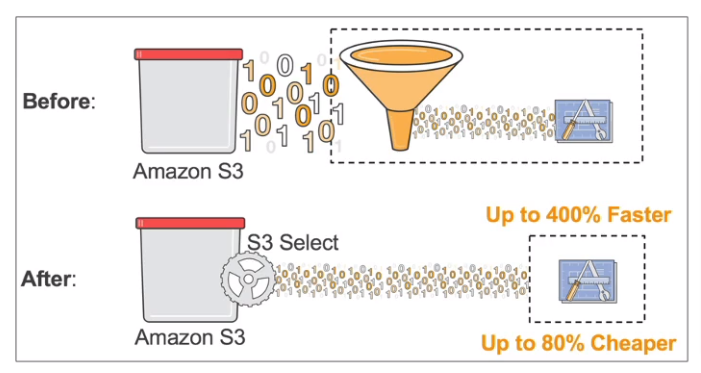
- S3 Select & Glacier Select
- Retrieve fewer data using SQL by performing server-side filtering
- Less network transfer, Less CPU cost on client-side
- Batch Operations
- Perform bulk operations on existing S3 objects with a single request
- Example: Modify object metadata & properties, Copy objects between S3 buckets, Encrypt un-encrypted objects, Modify ACLs and tags, Restore objects from S3 Glacier, Invoke Lambda function to perform custom action on each object
- A job consists of a list of objects, the action to perform, and optional parameters
- S3 Batch Operations manages retries, tracks progress, sends completion notifications, generates reports
- Can use S3 Inventory to get object list and use S3 Select to filter objects
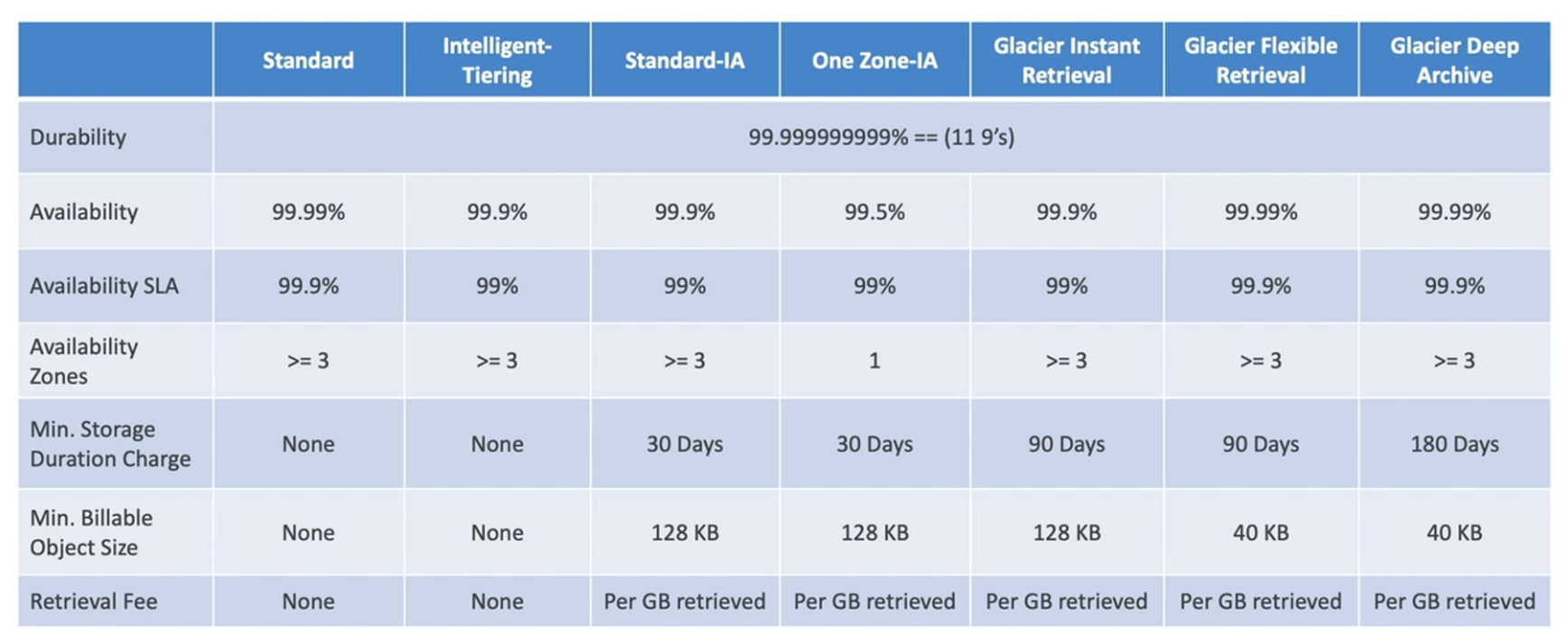
- Durability 99.999999999% (11 9's) of objects across multiple AZ for all storage classes (Loss object once every 10,000 years)
- Storage Classes
- Standard - General Purpose
- Availability 99.99% (not available 53 minutes a year)
- Sustain 2 concurrent facility failures
- Standard-Infrequent Access (IA)
- Lower cost than standard
- 99.9% Availability
- Use cases: Backup, DR
- One Zone-Infrequent Access
- High durability (99.999999999%) in a single AZ (but data lost when AZ is destroyed)
- 99.5% Availability
- Use cases: storing secondary backup copies if on-premise data
- Glacier Instant Retrieval
- Millisecond retrieval, accessed once a quarter
- Minimum storage duration of 90 days
- Glacier Flexible Retrieval (formerly S3 Glacier)
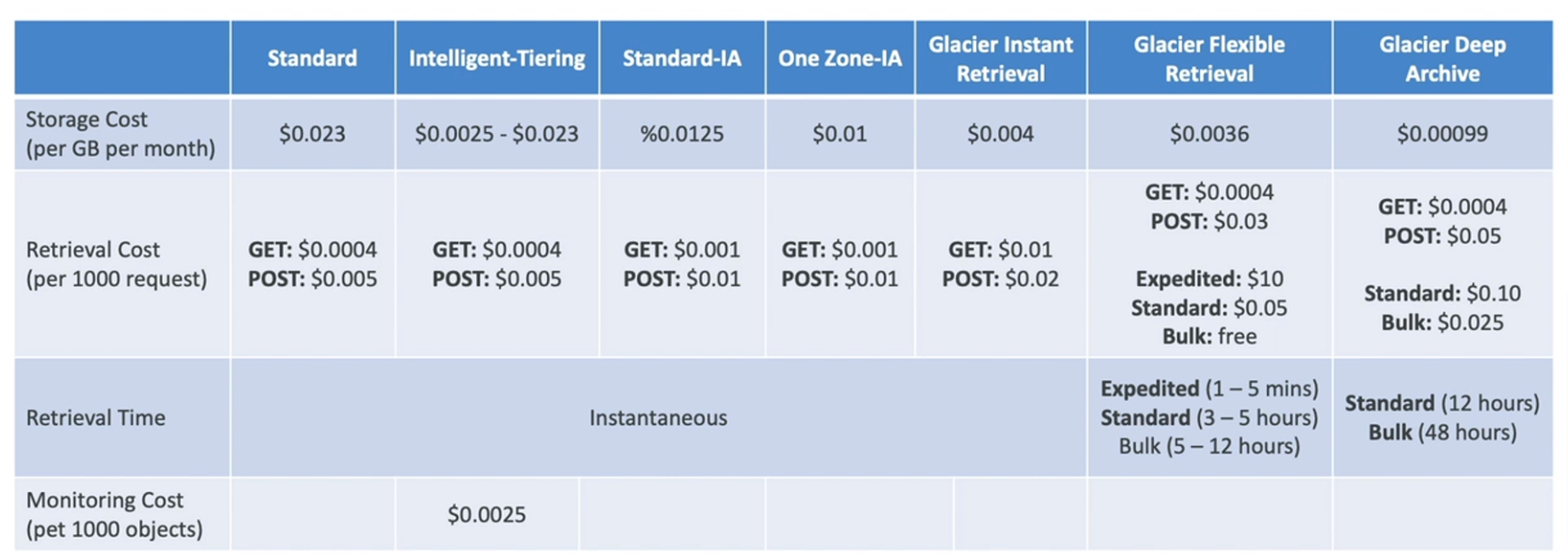
- Expedited (1-5 minutes), Standard (3-5 hours), Bulk (5-12 hours) - free
- Minimum storage duration of 90 days
- Glacier Deep Archive (For long-term storage)
- Standard (12 hours), Bulk (48 hours)
- Minimum storage duration of 180 days
- Intelligent Tiering
- Small monthly monitoring and auto-tiering fee
- Moves objects automatically between Access Tiers based on usage
- There are no retrieval charges in S3 Intelligent-Tiering
- Tiers
- Frequent Access tier (automatic): default
- Infrequent Access tier (automatic): not accessed for 30 days
- Archive Instant Access tier (automatic): not accessed for 90 days
- Archive Access Access tier (optional): config from 90-700+ days
- Deep Archive Access tier (optional): config from 180-700+ days
- Standard - General Purpose
- Cost
- Security
- User-based
- IAM Policies - Allow for a specific user from IAM
- Resource-Based
- Bucket Policies - Bucket-wide rules from the s3 console (allow cross-account)
- Object ACL - finer grain (can be disabled)
- Bucket ACL - less common (can be disabled)
- IAM can access an s3 object if (The user IAM permissions allow it OR the resource policy allows it) AND there's no explicit deny
- MFA Delete
- Require MFA when Permanently delete or Suspend versioning
- Versioning must be enabled
- Only the bucket owner can enable/disable MFA Delete
- Can't use in AWS Console (only working on AWS CLI, SDK, or REST API)
- User-based
- S3 Access Logs
- Audit any access to s3 buckets
- Logged into another S3 bucket (Must be in the same AWS region)
- If logged in the same bucket, It will create a logging loop
- Analyzed using data analysis tools
- S3 Pre-signed URLs
- URL Expiration
- S3 Console - 1 min up to 720 mins (12 hours)
- AWS CLI - default 3600 secs, max 604800 secs (168 hours)
- URL Expiration
- S3 Access Points
- Simplify security management for S3 buckets
- Use access point policy to allow access to the S3 bucket by prefix
- Each access point has its own DNS (Internet or VPC) name and policy
- VPC Origin
- Access within the VPC only
- Must create a VPC Endpoint (must allow access to target bucket and Access Point)
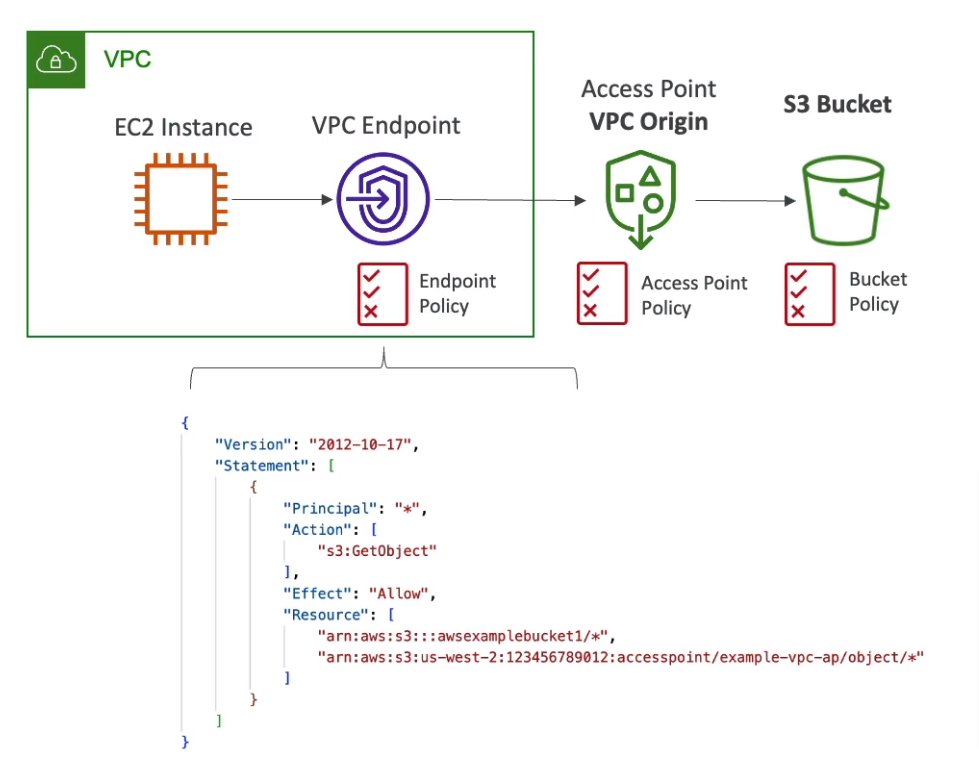
- VPC Origin
- S3 Object Lambda (Access Point)
- Use AWS Lambda Functions to change the object before it is retrieved by the caller application
- Support with S3 Access Point
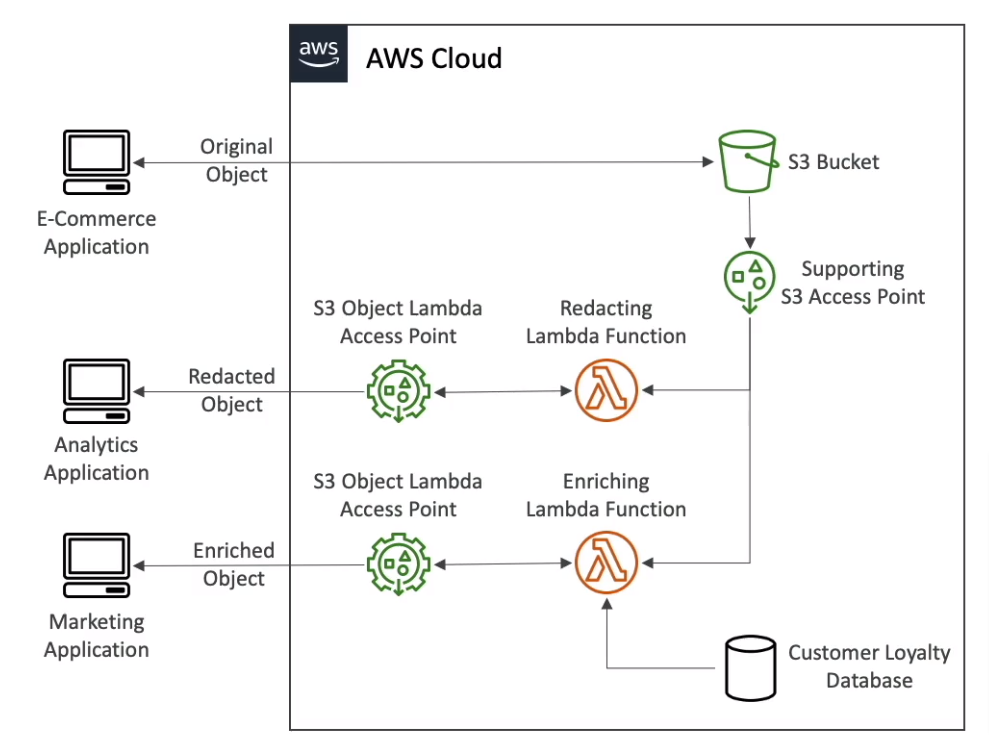
- S3 Object Lock
- Adopt a WORM model (Write Once Read Many)
- Block an object version deletion for a specified amount of time
- Must enable versioning
- Retention mode
- Compliance - Block all user
- Governance - Allow some user
- Retention Period - Protect the object for a fixed period, Can be extended
- Legal Hold
- Protect the objects indefinitely, independent from the Retention period
- Freely placed and removed using the
s3:PutObjectLegalHoldIAM permission
- S3 Glacier Vault Lock
- Adopt a WORM model (Write Once Read Many)
- Vault Lock Policy (Can lock the policy for future edits)
- Helpful for compliance and data retention
- Object Encryption
- Server-Side Encryption (SSE)
- with Amazon S3-Managed Keys (SSE-S3) - Enabled by default
- Must set header ``"x-amz-server-side-encryption": "AES256"`
- with KMS Keys stored in AWS KMS (SSE-KMS)
- User control and audit key usage using CloudTrail
- Must set header
"x-amz-server-side-encryption": "aws:kms" - Limitations
- Upload calls the GenerateDataKey KMS API
- Download calls the Decrypt KMS API
- Count towards the KMS quota per second (5500, 10000, 30000 req/s based on region)
- Can request to increase quota using Service Quotas Console
- with Customer-Provided Keys (SSE-C)
- HTTPS must be used
- The encryption key must be provided in HTTP headers for every request made
- Can force encryption using a bucket policy and refuse any API call without encryption headers
- Bucket Policies are evaluated before "Default Encryption"
- with Amazon S3-Managed Keys (SSE-S3) - Enabled by default
- Client-Side Encryption
- Use client libraries such as Amazon S3 Client-Side Encryption Library
- Encrypt before sending to S3, and decrypt data themselves
- Encryption in transit (SSL/TLS) S3 exposes two endpoints
- HTTP Endpoint - non-encryption
- HTTPS Endpoint - encryption in flight
- Can force encryption in transit with
aws:SecureTransportin IAM Policy condition
- Server-Side Encryption (SSE)
- CORS (Cross-Origin Resource Sharing)
- Define in JSON format
- Origin = Scheme (protocol) + Host (domain) + Port
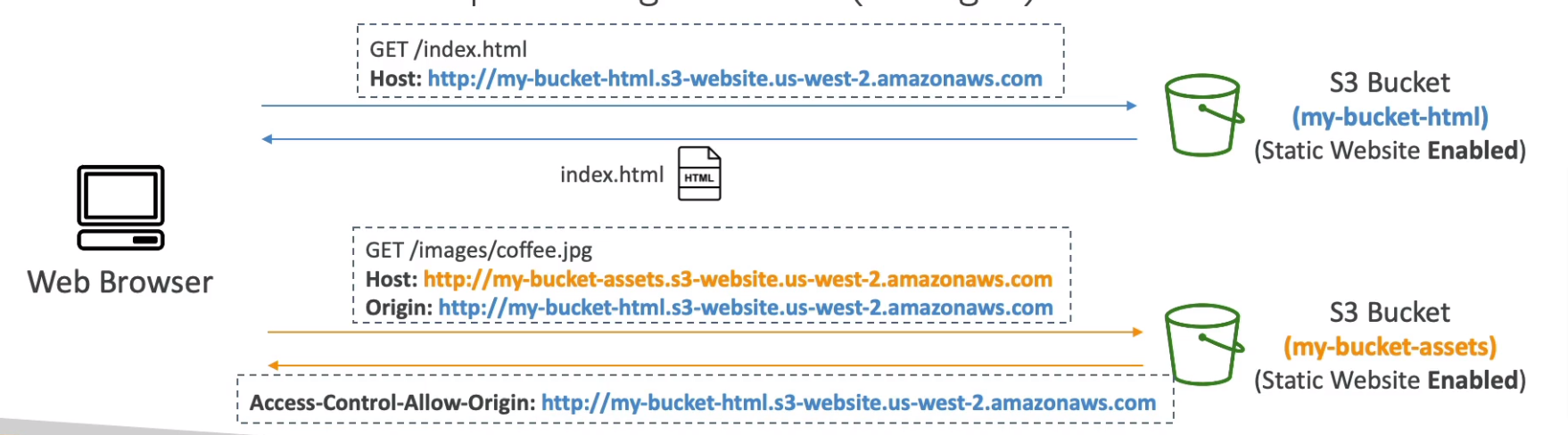
- Replication
- Must enable versioning
- Cross-Region Replication (CRR) - Compliance, Lower latency access
- Same-Region Replication (SRR) - Log aggregation, Live replication between production and test accounts
- The buckets can be in different AWS accounts
- Must give proper IAM permission to S3
- Only new objects are replicated when enabling replication
- Use S3 Batch Replication for existing objects
- For DELETE operations will replicate delete markers (need to enable)
- Delete with version ID are not replicated (avoid malicious deletes)
- There is no "chaining" of replication
AWS Snow Family
- Highly secure, portable device to collect and process data at the edge, and migrate data into and out of AWS
- If data migration takes more than a week, Use Snowball devices
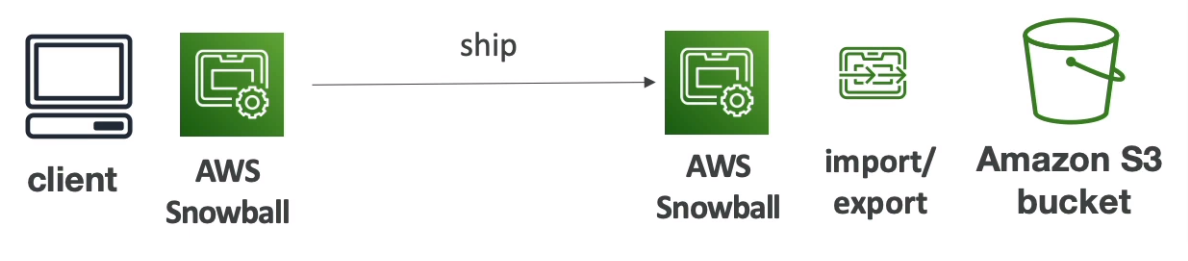
- Process
- Request Snowball devices from the AWS console for delivery
- Install the snowball client / AWS OpsHub on your server
- Connect the snowball to your servers and copy files using the client
- Ship back
- Data will be loaded into an S3 bucket
- Snowball is completely wiped
- Can't import directly into Glacier
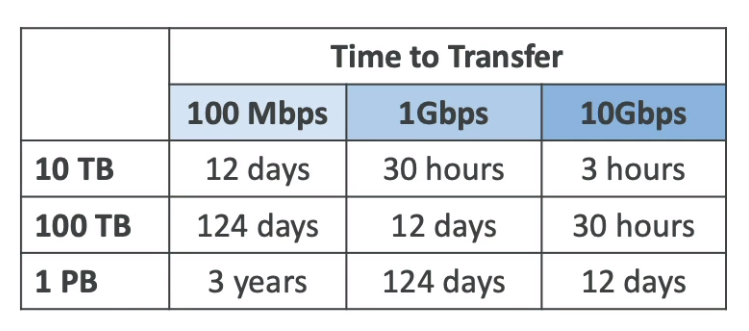
Snowcone
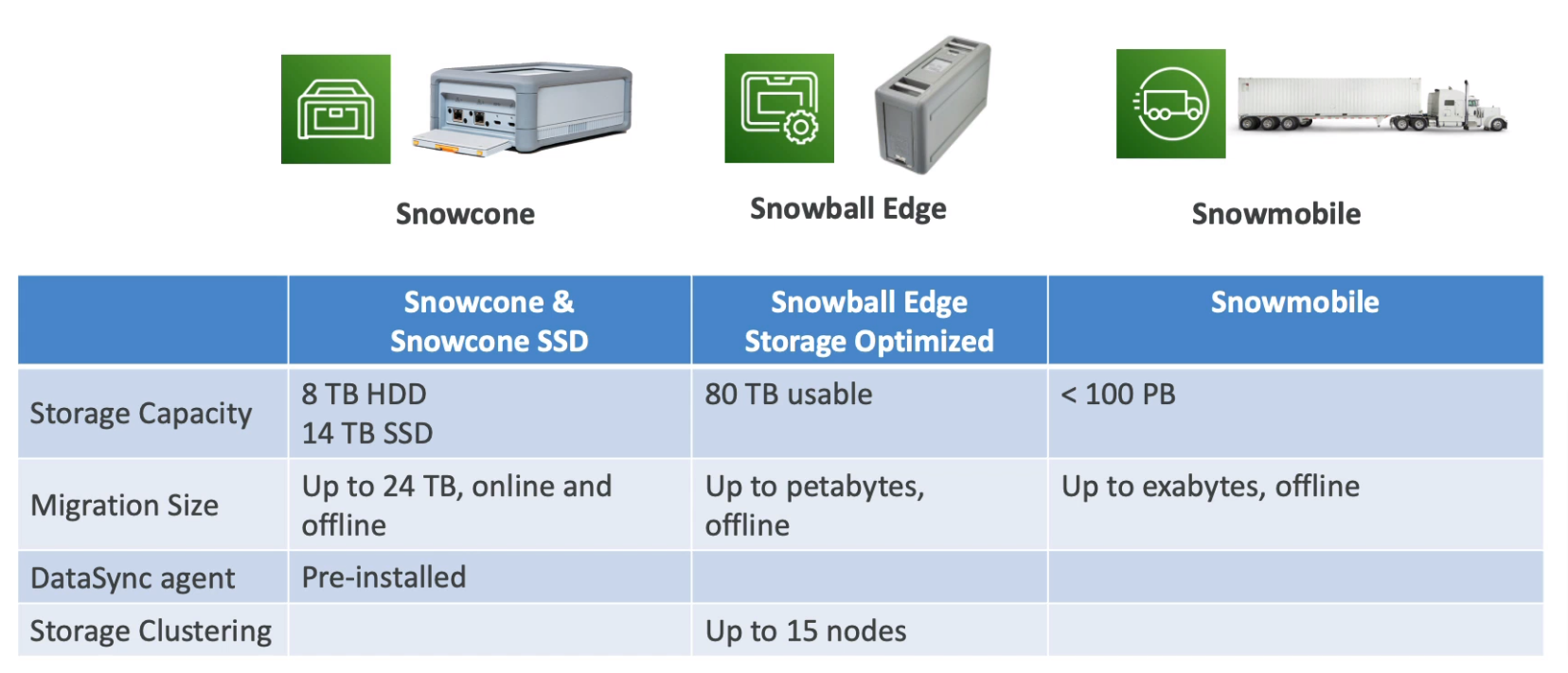
- Light and small (4.5 pounds, 2.1 kg)
- Types
- Snowcone
- 8 TB of HDD storage
- Snowcone SSD
- 14 TB of SSD storage
- Snowcone
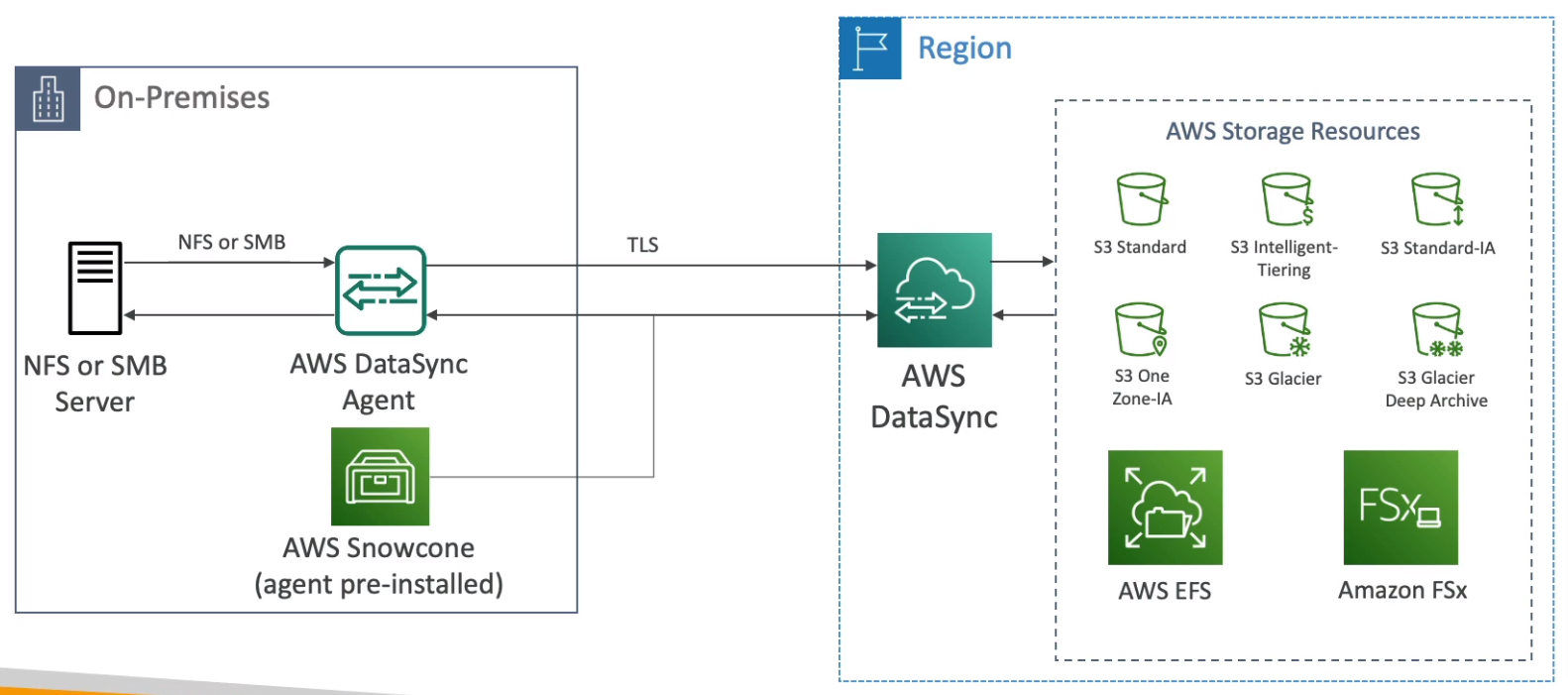
- Can send it back to AWS offline, or connect it to the internet and use AWS DataSync to send data
- Edge computing
- Snowcone & Snowcone SSD, 2 CPUs, 4 GB
Snowball Edge
- Pay per data transfer job
- Provide block storage and S3-compatible object storage
- Types
- Snowball Edge Storage Optimized
- 80 TB of HDD capacity
- Snowball Edge Compute Optimized
- 42 TB of HDD or 28 TB NVMe capacity
- Snowball Edge Storage Optimized
- Edge computing
- Compute Optimized
- 104 vCPU, 416 GiB of RAM, optional GPU
- Storage Optimized
- 40 vCPU, 80 GiB of RAM
- Object storage clustering is available
- All can run EC2 Instances & AWS Lambda functions (using AWS IoT Greengrass)
- Long-term deployment options 1 and 3 years discounted pricing
- Compute Optimized
Snowmobile
- Transfer exabytes of data by truck
- Each Snowmobile has 100PB of capacity (Use multiple in parallel)
- High-security temperature controlled, GPS, 24/7 video surveillance
AWS OpsHub
- Historically, To use Snow Family devices, You needed a CLI, Today you can use AWS OpsHub
- Unlocking and configuring instances running on Snow Family Devices
- Launching and managing instances running on Snow Family Devices
- Monitor device metrics (storage capacity on Snow Family Devices)
- Launch compatible AWS services on your devices (EC2 instances, AWS DataSync, NFS)
AWS DataSync
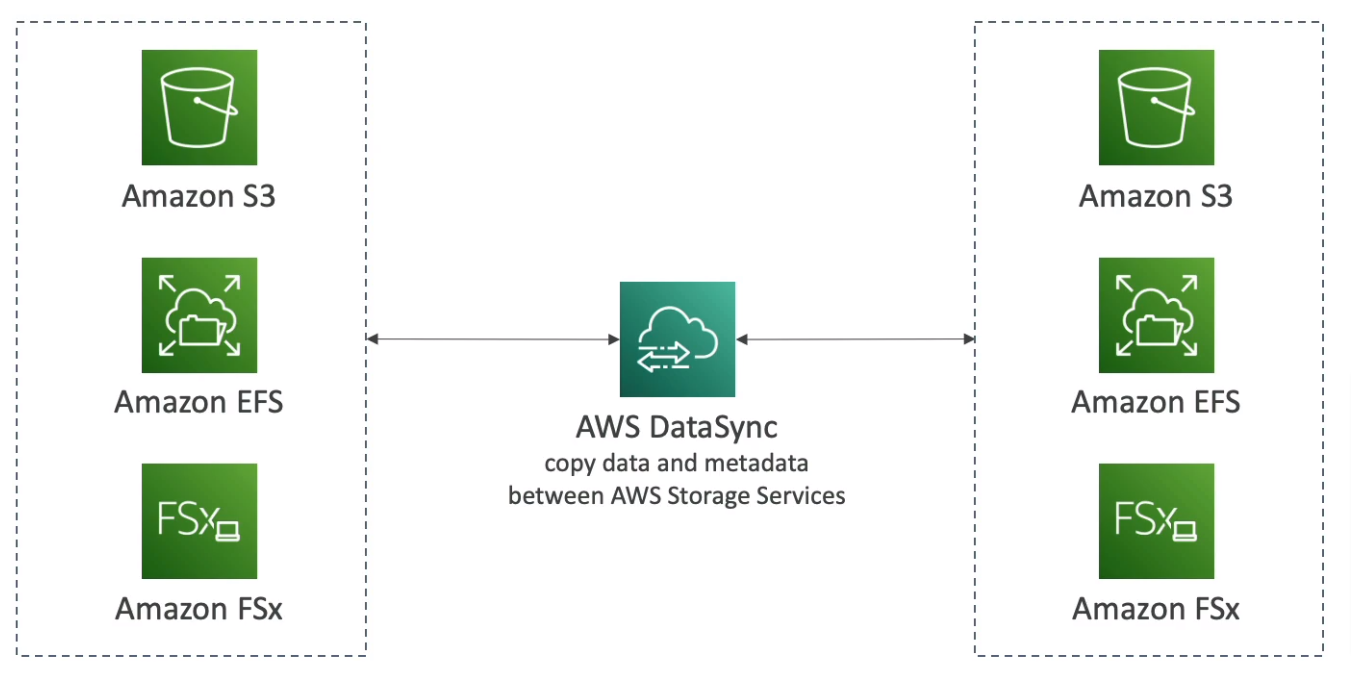
- Move large amounts of data between on-premises, other clouds, or AWS
- Can synchronize to S3, EFS, or FSx
- Replication tasks can be scheduled hourly, daily, weekly
- File permissions and metadata are preserved (NFS POSIX, SMB)
- One agent task can use 10 Gbps, Can setup a bandwidth limit
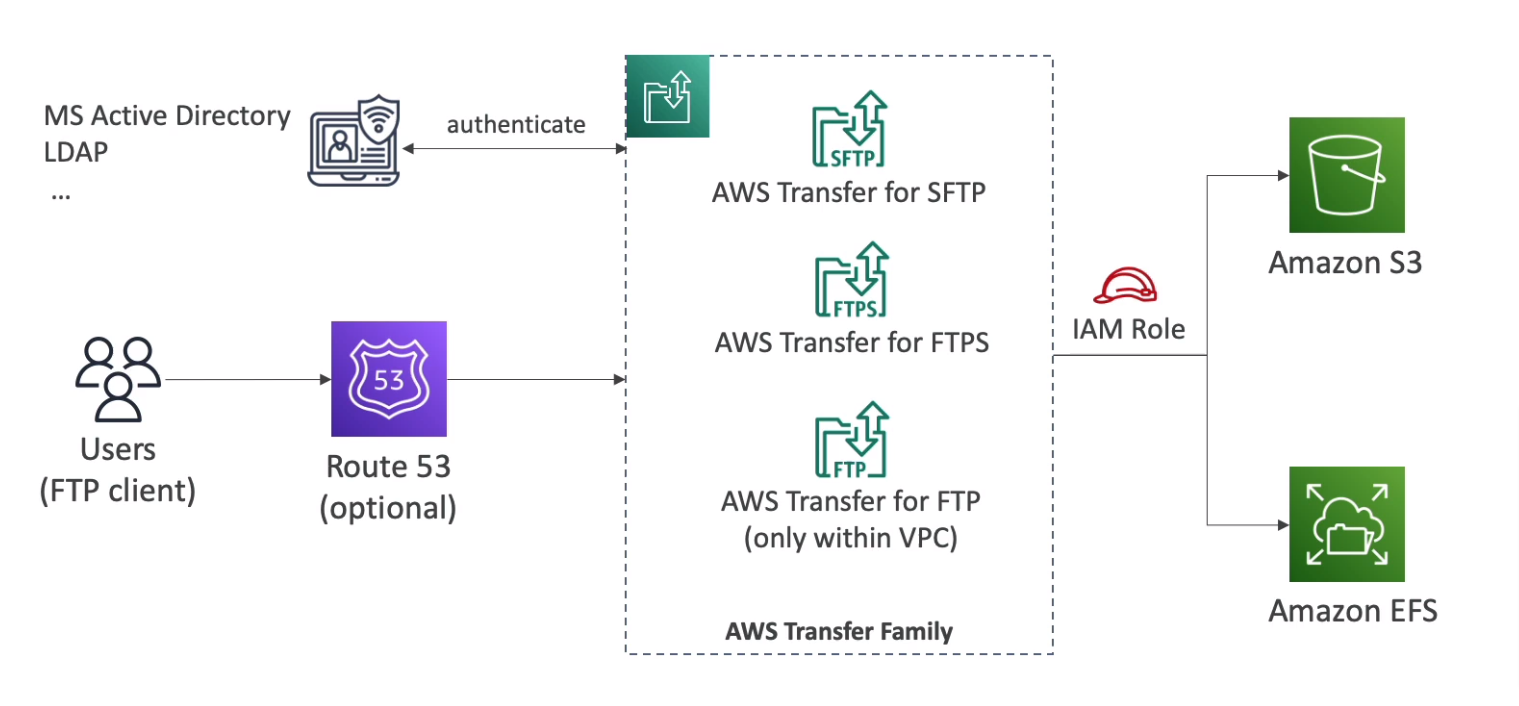
AWS Transfer Family
- File transfers service for S3 or EFS using FTP protocol (FTP, FTPS, SFTP)
- Managed infrastructure, Scalable, Reliable, Highly Available (Multi-AZ)
- Pay per provisioned endpoint per hour + data transfers in GB
- Store and manage users' credentials within the service
- Integrate with existing authentication systems (Microsoft Active Directory, LDAP, Okta, Amazon Cognito)
- Usage: Sharing files, Public datasets, CRM, ERP
EBS
- Elastic Block Store is a network drive
- Can mount only one instance at a time
- Bound to a specific AZ
- Type
- gp2 / gp3 (SSD): general purpose, 1GiB - 16 TiB
- io1 / io2 (SSD): highest-performance, 4GiB - 16 TiB
- Support multi-attach in the same AZ up to 16 instances at a time
- st1 (HDD): low cost, 125GiB - 16 TiB
- sc1 (HDD): lowest cost, 125GiB - 16 TiB
- Only gp2/gp3 and io1/io2 can be used as boot volumes
- Data at rest is encrypted inside the volume
- All the data in flight moves between the instance and the volume is encrypted
- All snapshots are encrypted
- Encryption has a minimal impact on latency
- EBS encryption leverages keys from KMS (AES-256)
Snapshot
- Make a backup at a point in time
- Not necessary to detach the volume to do a snapshot, but recommended
- Can copy snapshots across AZ or Region
Snapshot Archive
- Move a snapshot to an "archive tier" that is 75% cheaper
- 24 to 72 hours for restoring the archive
Recycle Bin
- Setup rules to retain deleted snapshots so you can recover them after an accidental deletion
- Specific retention (from 1 day to 1 year)
Fast Snapshot Restore (FSR)
- Force full initialization of snapshot to have no latency on the first use ($$$)
Instance Store
- High-performance hardware disk
- Better I/O performance
- Ephemeral, Lose when stopping the instance
- Good for the buffer, cache, scratch data / temporary content
- Backup and Replication are your responsibility
EFS
- Managed NFS that can mount on many EC2
- Work with EC2 instances in multi-AZ
- Highly available, scalable, expensive (3x gp2), pay per use
- Use NFSv4.1 protocol
- Use a security group to control access
- Compatible with Linux-based AMI
- Modes
- Performance Mode
- General Purpose (default)
- Max I/O: higher latency, throughput, highly parallel
- Throughput Mode
- Bursting: 1 TB = 50 MiB/s + burst of up to 100 MiB/s
- Provisioned: set your throughput regardless of storage size
- Elastic: automatically scales throughput up or down based on your workload
- Up to 3 GiB/s for reads and 1 GiB/s for writes
- Performance Mode
- Storage Tiers
- Standard: frequently accessed files
- Infrequent access (IA): cost to retrieve files, lower price to store
- Availability and durability
- Standard: Multi-AZ
- One zone: One AZ, Backup enabled by default, compatible with IA, 90% cost saving
- Lifecycle Policy: move files between storage tier
- File system policy: Control the access permission in EFS
FSx
- Fully managed service 3rd party high-performance file systems on AWS
- Types
- FSx for Lustre
- Parallel distributed file system for large-scale computing
- the name Lustre is derived from Linux and cluster
- Use cases: ML, High-Performance Computing (HPC), Video processing, Financial Modeling, Electronic Design Automation
- Scales up to 100s GB/s, millions of IOPS, sub-ms latencies
- Storage options: HDD and SSD
- Seamless integration with S3 (read/write S3 as file system)
- Can be accessed from on-premises infrastructure (VPN or Direct Connect)
- FSx for Windows File Server
- Windows file system share drive
- Supports SMB protocol & Windows NTFS
- Microsoft Active Directory integration, ACLs, user quotas
- Supports Microsoft's Distributed File System (DFS) Namespaces (group files across multiple FS)
- Scale up to 10s of GB/s, millions of IOPS, 100s PB of data
- Storage options: HDD and SSD
- Can be mounted on Linux EC2 instances
- Can be accessed from on-premises infrastructure (VPN or Direct Connect)
- Can be configured to be Multi-AZ (HA)
- Data is backup to S3
- FSx for NetApp ONTAP
- File System compatible with NFS, SMB, iSCSI protocol
- Move workloads running on ONTAP or NAS to AWS
- Works with Linux, Windows, MacOS, VMWare Cloud on AWS, Amazon Workspaces & AppStream 2.0, EC2, ECS, and EKS
- Storage shrinks or grows automatically
- Snapshots, replication, low-cost, compression and data de-duplication
- Point-in-time instantaneous cloning (helpful for testing new workloads)
- FSx for OpenZFS
- File system compatible with NFS (v3, v4, v4.1, v4.2)
- Move workloads running on ZFS to AWS
- Works with Linux, Windows, MacOS, VMWare Cloud on AWS, Amazon Workspaces & AppStream 2.0, EC2, ECS, and EKS
- Up to 1,000,000 IOPS with < 0.5ms latency
- Snapshots, compression, and low-cost
- Point-in-time instantaneous cloning (helpful for testing new workloads)
- FSx for Lustre
- Deployment Options
- Scratch File System
- Temporary storage
- Data is not replicated (doesn't persist if file server fails)
- High burst (6x faster, 200 MB/s per TiB)
- Usage: Short-term processing, optimizing costs
- Persistent File System
- Long-term storage
- Data is replicated within the same AZ
- Replace failed files within minutes
- Usage: long-term processing, sensitive data
- Scratch File System
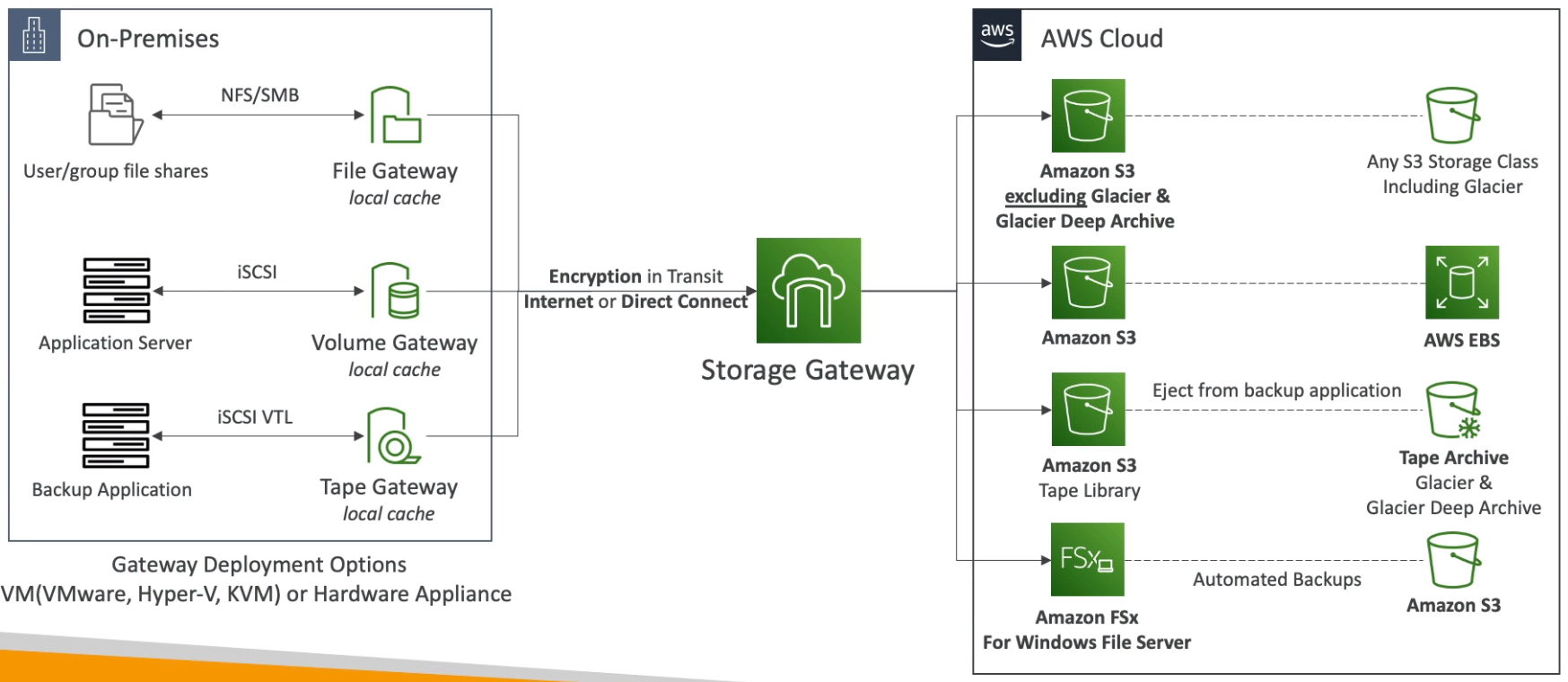
Storage Gateway
- Hybrid Cloud for Storage
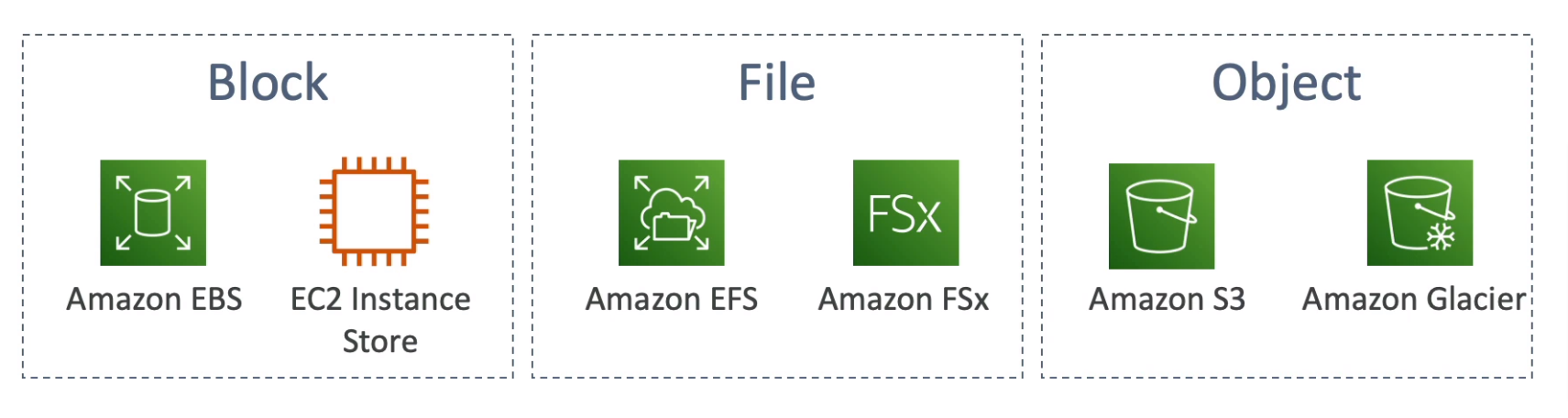
- Types of Storage Gateway
- S3 File Gateway
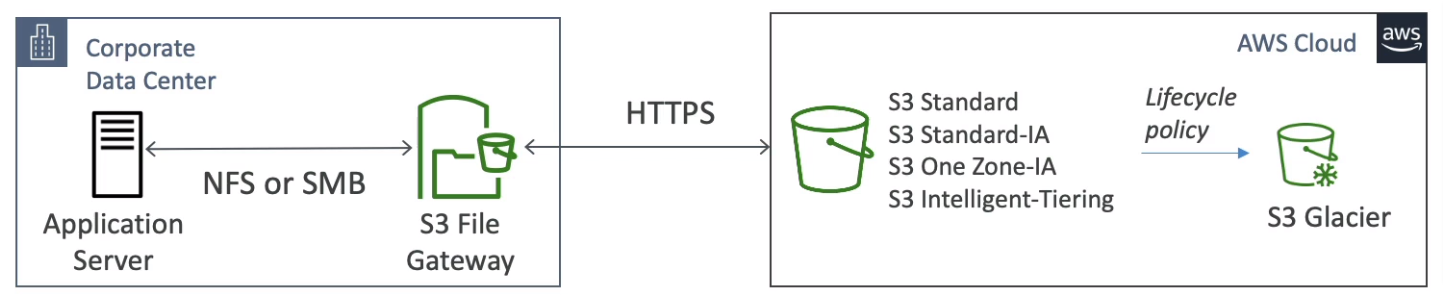
- FSx File Gateway
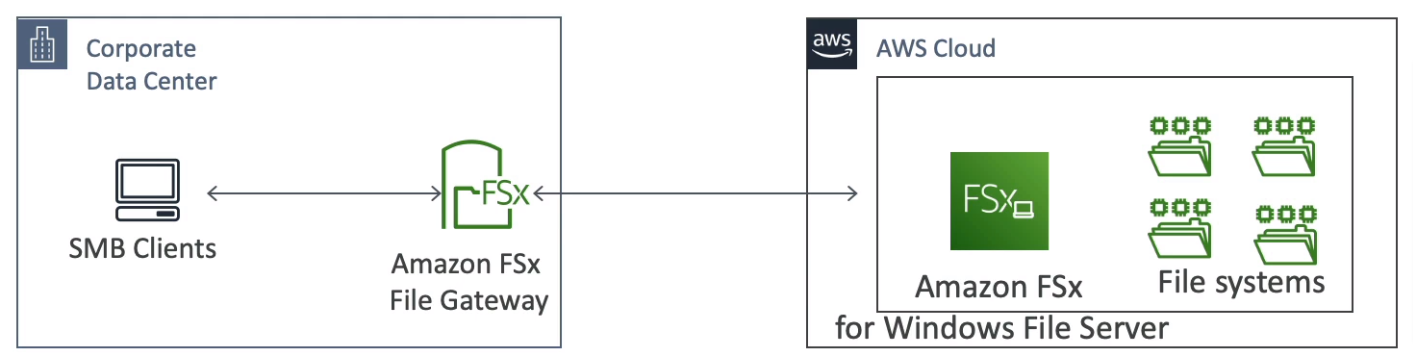
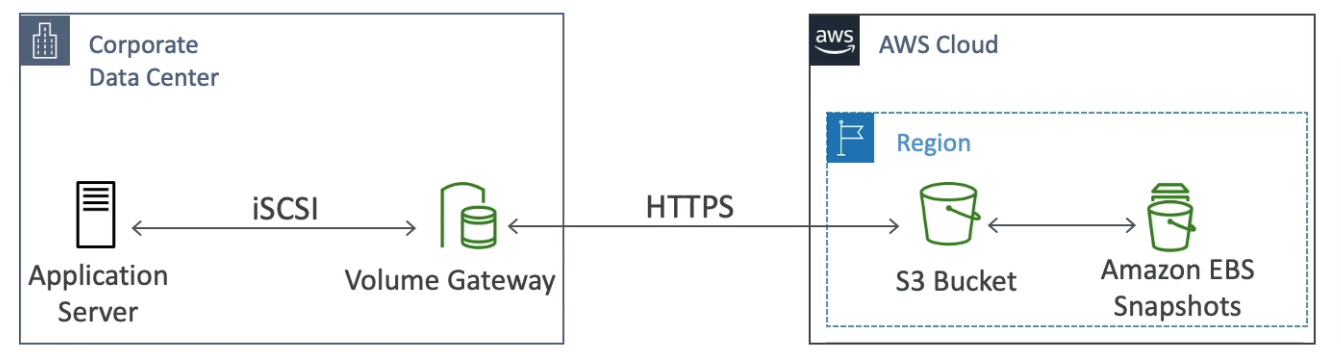
- Volume Gateway
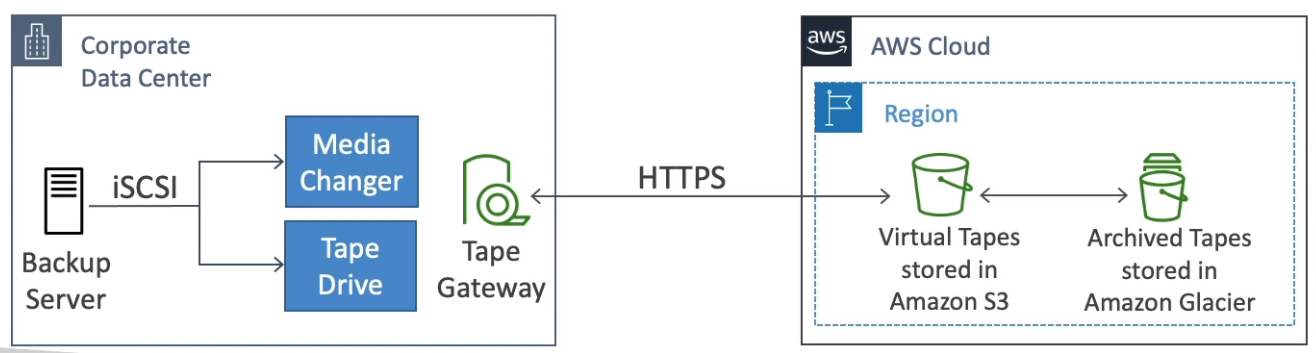
- Tape Gateway
- S3 File Gateway
- Use cases
- Disaster recovery
- Backup & Recovery
- Tiered storage
- On-premises cache & low-latency files access
- Using Storage Gateway
- On-premises virtualization (ESXi, Hyper-V, KVM, or EC2)
- Storage Gateway Hardware Appliance (buy at amazon.com)
- Works with File Gateway, Volume Gateway, and Tape Gateway
- Has the required CPU, Memory, Network, and SSD cache resources
- Helpful for daily NFS backups in small data centers
RDS
- Stands for Relational Database Service and It managed by AWS
- Supports Postgres, MySQL, MariaDB, Oracle, MSSQL, Aurora (AWS Proprietary)
- Automated provisioning, OS patching
- Continuous backups and restore to specific timestamps (PTO)
- Monitoring dashboard
- Read replicas for improved read performance
- Up to 15 Read replicas
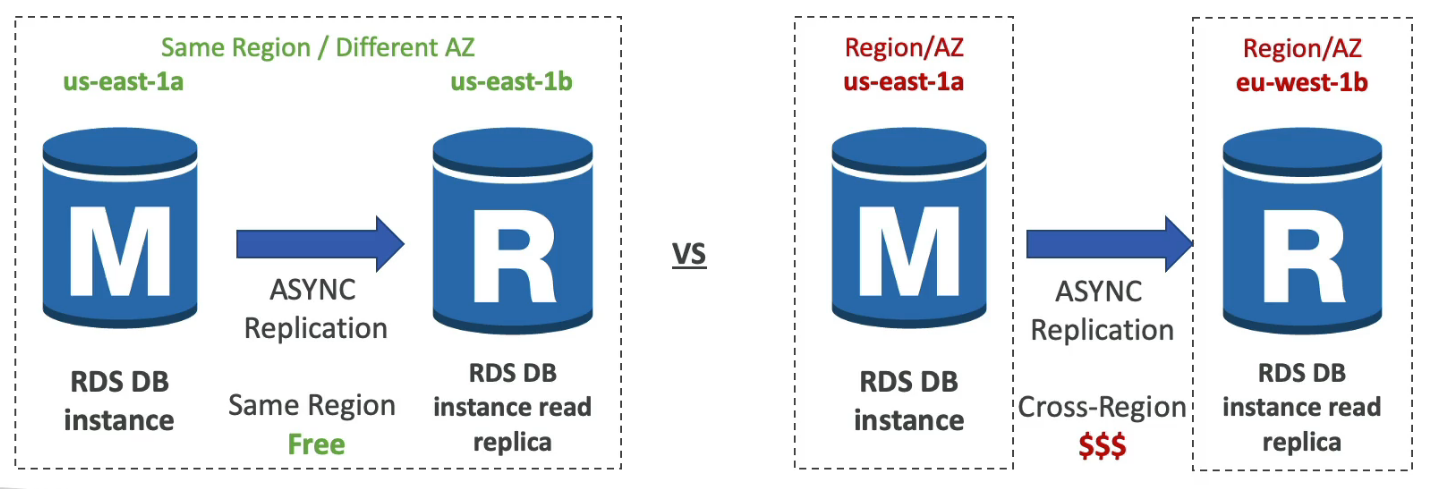
- Within AZ, Cross AZ, or Cross Region
- Replication is Async, So reads are eventually consistent
- Can be promoted
- Multi-AZ setup for DR (disaster Recovery), Sync replication, One DNS name, and automatic app failover to standby
- Maintenance windows for upgrades
- Scaling capability (vertical and horizontal)
- Backup
- Automated backup
- Daily full backup during the backup window
- Transaction logs backup every 5 minutes
- 1 - 35 days of retention (set to 0 to disable)
- Manual snapshot
- Retention as long as you want
- Automated backup
- Storage backed by EBS (gp2 or io1)
- Auto-scaling for storage
- Network cost: Normally network costs when data goes from one AZ to another, but RDS read replicas within the same region are FREE!
- Can't SSH into the instance
- RDS Custom: Managed Oracle and MSSQL can access the underlying database and OS
- Restore
- from snapshot
- from S3 backup by Percona XtraBackup
- Clone from existing one
- Use copy-on-write protocol
- Initial the new DB uses the same data volume (no copying is needed)
- When updates are made to the new DB then additional storage is allocated and data is copied to be separated
- fast & cost-effective
- Useful for creating staging DB from production without impact on production DB
- Use copy-on-write protocol
- Security
- At-rest Encryption by KMS
- In-flight encryption is enabled by default use with the AWS TLS root certificates client-side
- If the master is not encrypted, the replicas can't be encrypted
- To encrypt an un-encrypted DB, snapshot and restore as encrypted
- Audit logs can be enabled
- Proxy
- Pool and share FB connections established with the database
- Improving database efficiency by reducing the stress on database resources and minimizing open connections (and timeouts)
- Serverless, Autoscaling, HA (multi AZ)
- Reduced RDS & Aurora failover time by up to 66%
- No code changes are required for most apps
- Enforce IAM Authentication for DB and securely store credentials in AWS Secrets Manager
- RDS Proxy is never publicly accessible (must be accessed from VPC)
Aurora
- A proprietary database from AWS supports Postgres and MySQL
- Aurora is "AWS cloud-optimized" and claims 5x performance improvement over MySQL on RDS, over 3x the performance of Postgres on RDS
- Storage automatically grows in increments of 10GB up to 128 TB
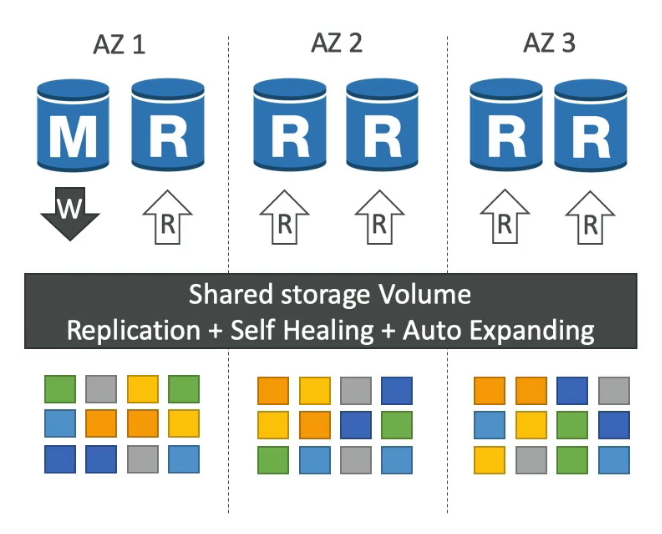
- One Aurora Instance tasks write (master)
- Up to 15 replicas and the replication process is faster than MySQL (sub 10ms replica lag)
- Failover in Aurora is instantaneous (less than 30 seconds), native HA
- 6 copies of your data across 3 AZ
- 4 copies out of 6 needed for writes
- 3 copies out of 6 need for reads
- Self-healing with P2P replication
- Storage is striped across 100s of volumes
- Support Cross Region Replication
- Cost more than RDS around 20%
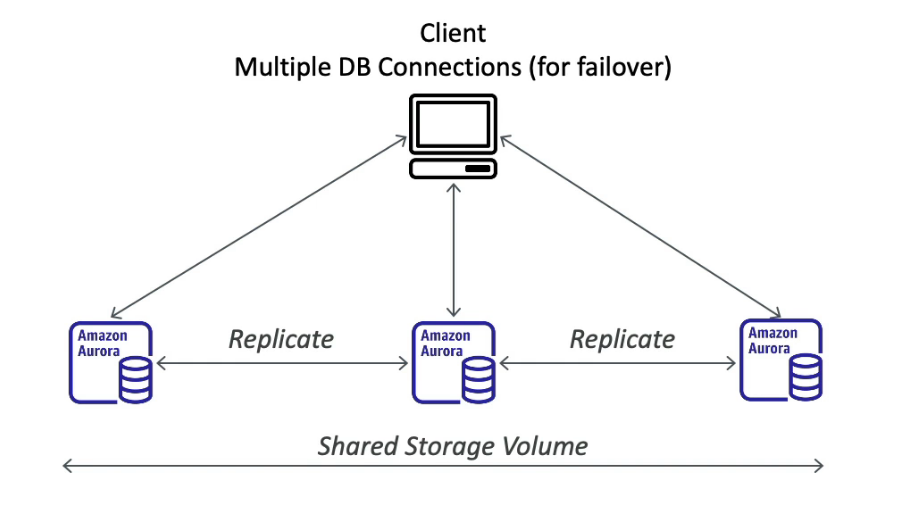
- Aurora Multi-Master: Immediate failover for write node (HA)
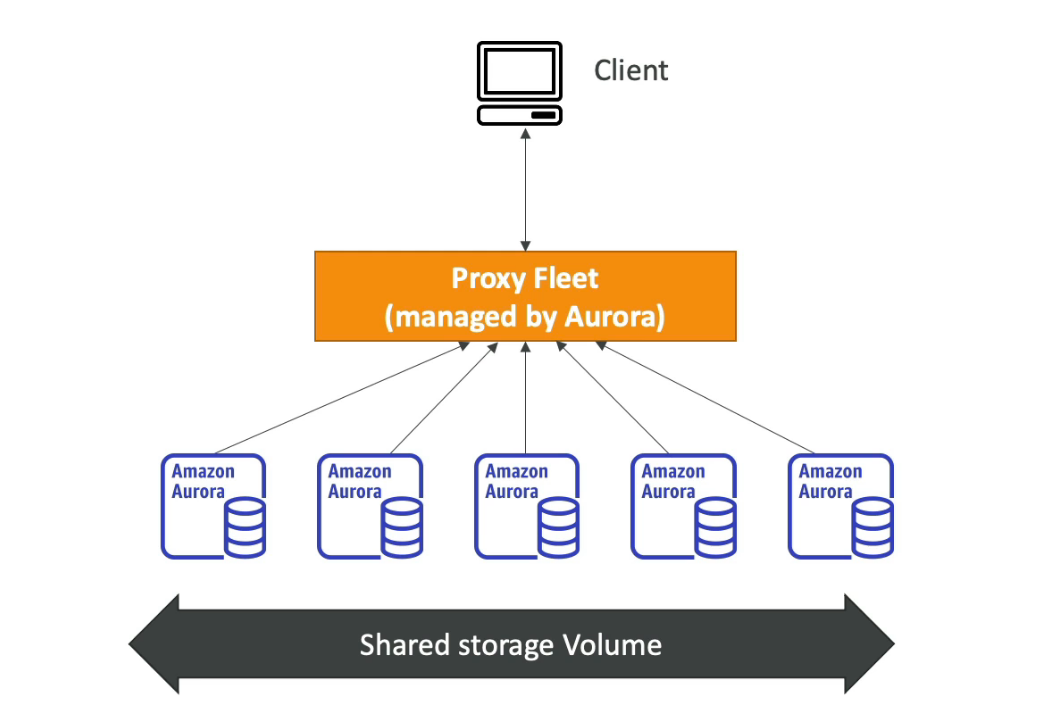
- Serverless
- Automated database instantiation and auto-scaling
- No capacity planning needed
- Pay per second can be more cost-effective
- Global Aurora
- Aurora Cross Region Replicas
- Useful for DR
- Simple to put in place
- Aurora Global Database (recommended)
- 1 primary region
- Up to secondary (RO) regions, replication lag is less than 1 second
- Up to 16 Read replicas per secondary region
- Help for decreasing latency
- Promoting another region (DR) has an RTO of less than 1 minute
- Typical cross-region replication takes less than 1 second
- Aurora Cross Region Replicas
- Aurora Machine Learning
- Enable to add ML-based predictions to your applications via SQL
- Integration with AWS ML services (AWS SageMaker, AWS Comprehend
- Not require ML experience
- Use cases: fraud detection, ads targeting, sentiment analysis, product recommendations
- Backup
- Automated backup
- 1 - 35 days of retention (can't disable)
- point-in-time in that timeframe
- Manual snapshot
- Retention as long as you want
- Automated backup
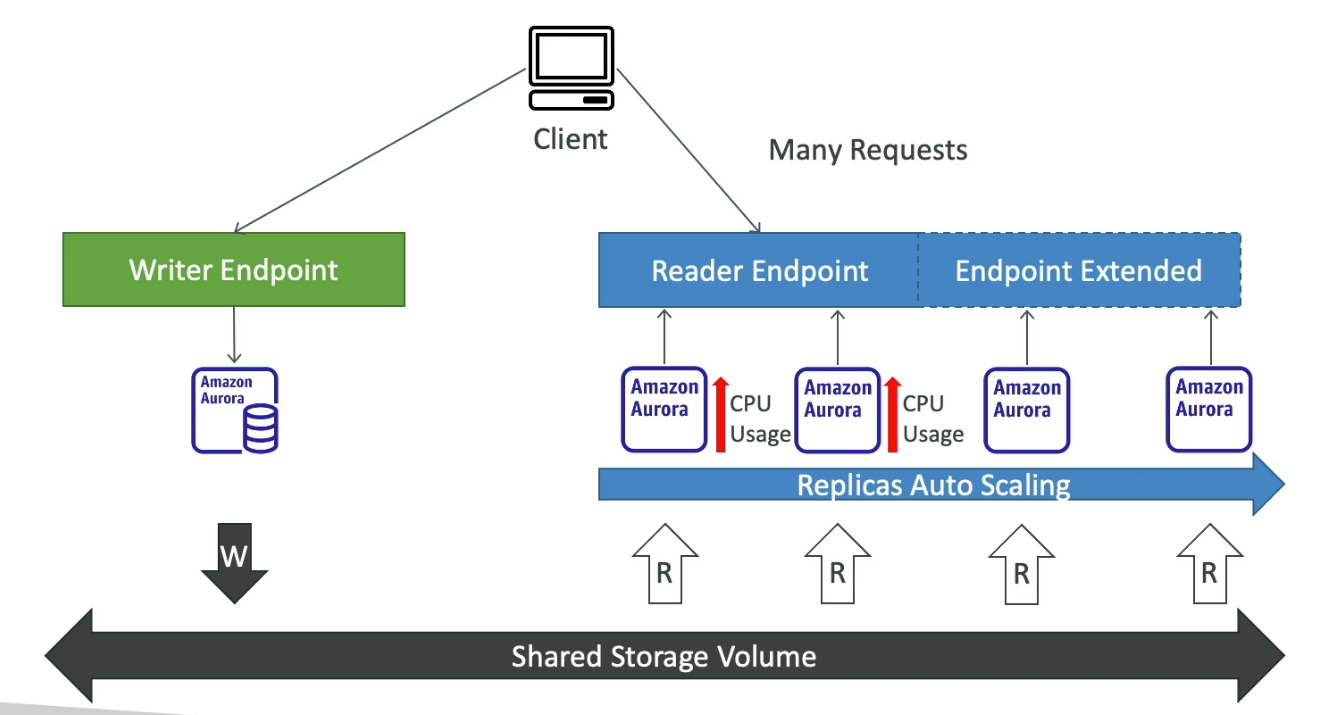
- Custom Endpoint
- Define a subnet of Aurora Instances as a Custom Endpoint
- The default reader endpoint is not used after defining Custom Endpoints
ElastiCache
- In-memory database managed by AWS supports Redis and Memcached
- IAM policies on ElastiCache are only used for AWS API-level security
- Redis
- Multi-AZ with Auto-Failover
- Read Replicas to scale reads and have HA
- Data Durability using AOF persistence
- Backup and restore features
- Support Sets and Sorted Sets
- Support IAM Authentication
- Can set a "password/token" with Redis Auth
- Support SSL in-flight encryption
- Memcached
- Multi-node for partitioning of data (sharding)
- No HA (replication)
- No persistent
- No backup and restore
- Multi-threaded architecture
- Support SASL-based authentication (advanced)