up to 90% discount (Most cost-efficient instances)
Instances can lose at any point in time if your max price is less than the current spot price
Dedicated Hosts (Book an entire physical server, Control instance placement)
Physical server with EC2 instance capacity fully dedicated
Allow for the compliance requirements and licenses (BYOL)
Purchasing options: On-demand (pay-per-second) and Reserved
Most expensive option
Dedicated Instances (no other customers will share your hardware)
Instances run on hardware that's dedicated to you
May share hardware with other instances in the same account
No control over instance placement (Can move hardware after Stop / Start)
Capacity Reservations (reserve capacity in a specific AZ for any duration)
Reserve on-demand instances capacity in a specific AZ for any duration
No time commitment (Create/Cancel anytime), No billing discount
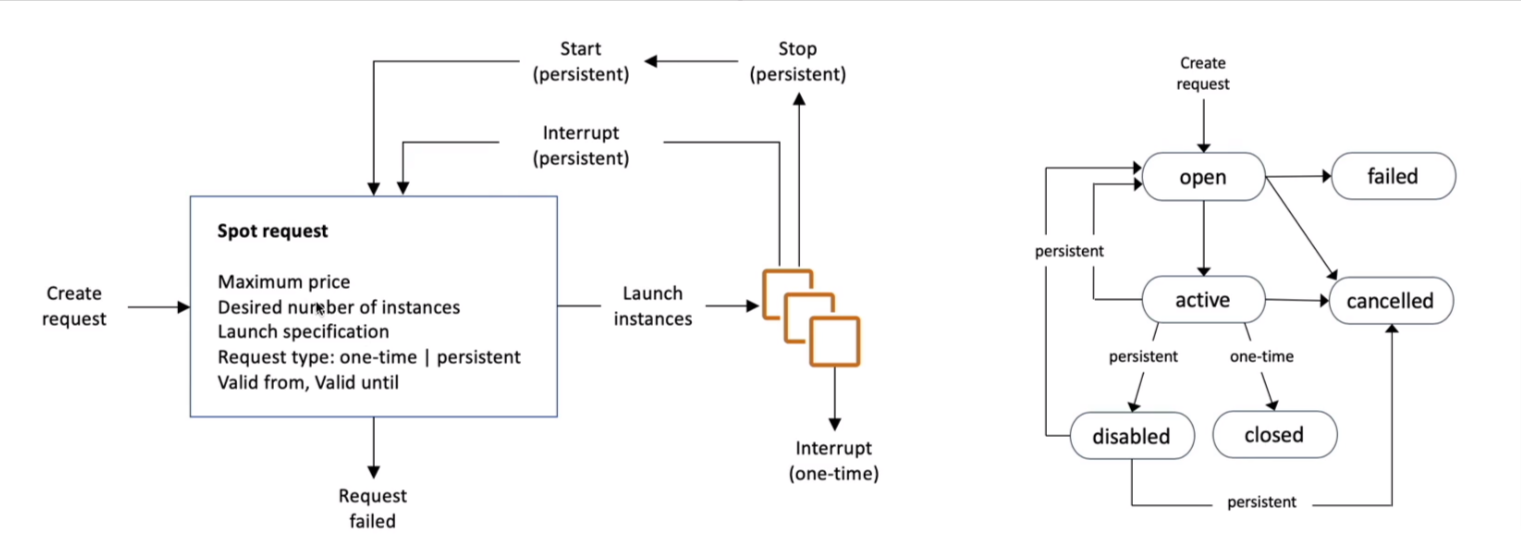
Spot Instance
define max spot price and get the instance while the current spot price < max
You can choose to Stop or Terminate in 2 minutes grace period
You can only cancel Spot Instance requests that are open, active, or disabled
Cancelling Spot Request does not terminate the instance
Spot Fleets
Set of Spot Instance + (optional) On-Demand Instance
The Spot Fleet will try to meet the target capacity with price constraints
Define possible launch pools (instance type, OS, zone)
Can have multiple launch pools, so the fleet can choose
Spot Fleet stops launching instances when reaching capacity or max cost
Strategies to allocate Spot Instances
lowestPrice: from the pool with the lowest price (cost-optimized, short workload)
diversified: distributed across all pools (great for availability, long workloads)
capacityOptimized: pool with the optimal capacity for the number of instances
priceCapacityOptimized (recommended): pools with the highest capacity available, then select the pool with the lowest price (best choice for most workloads)
Spot Fleets allow us to automatically request Spot Instances with the lowest price
Placement Groups
Strategies
Cluster: Clusters instances into a low-latency group in a single AZ
Spread: spreads instances across underlying hardware (max 7 instances per group per AZ, Critical applications)
Partition: Spreads instances across many different partitions (which rely on different sets of racks) within an AZ, Scale to 100s of EC2 instances per group (Hadoop, Cassandra, Kafka)
Hibernate
Support instance families: C3, C4, C5, I3, M3, M4, R3, R4, T2, T3, and more
Root volume must be EBS and encrypted
Can't be hibernated for more than 60 days
Not support for bare metal instances
Ram must be less than 150GB
AMI
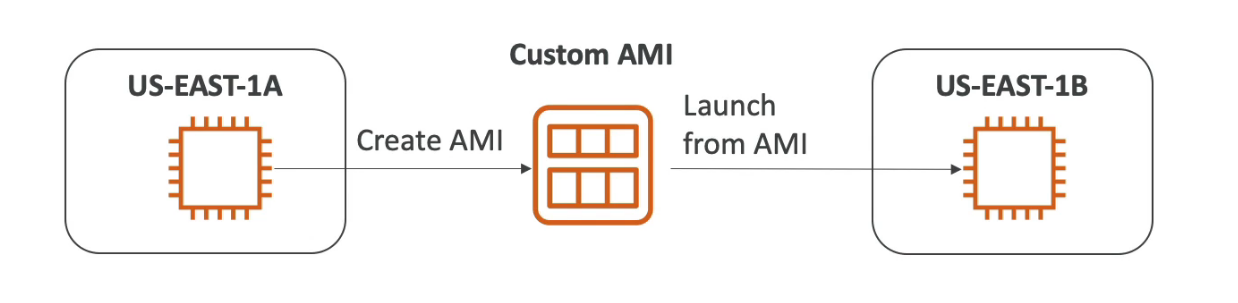
Amazon Machine Image is a customization of an EC2 instance image
Built for a specific region (can copy to another region)
Load Balancer
Spread the traffic across multiple servers downstream
Expose a single point of access (DNS) to your application
Seamlessly handle failures of downstream instances
SSL termination (Can manage certificates using ACM)
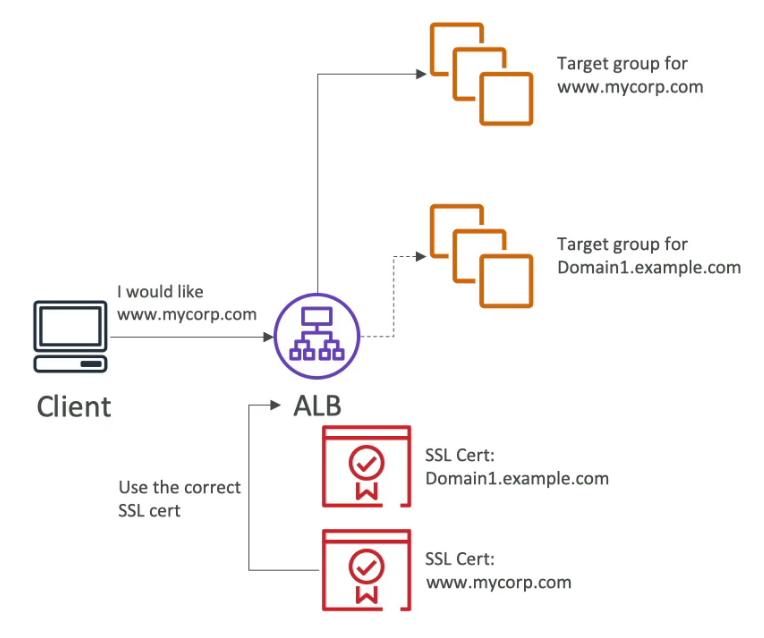
Support SNI (Server Name Indication) to solve the problem of loading multiple SSL onto one web server (To serve multiple websites)
It's a newer protocol and requires the client to indicate the hostname of the target server in the initial SSL handshake
The server will then find the correct certificate or return the default one
Only work for ALB & NLB (Newer generation), CloudFront
Sticky Sessions (Session affinity)
The same client always redirected to the same instance behind a load balancer
Works for CLB, ALB, and NLB
The cookie used for stickiness has an expiration date you control
Enabling stickiness may bring imbalance to the load over the backend
Cookie Names
Application-based Cookies
Custom cookie
Generated by the target
Can include any custom attributes required by the application
Cookie name must be specified individually for each target group
Don't use AWSALB, AWSALBAPP, or AWSALBTG (reserved for ELB)
Application cookie
Generated by the LB
The cookie name is AWSALBAPP
Duration-based Cookies
The cookie generated by the LB
Cookie name is AWSALB for ALB, AWSELB for CLB
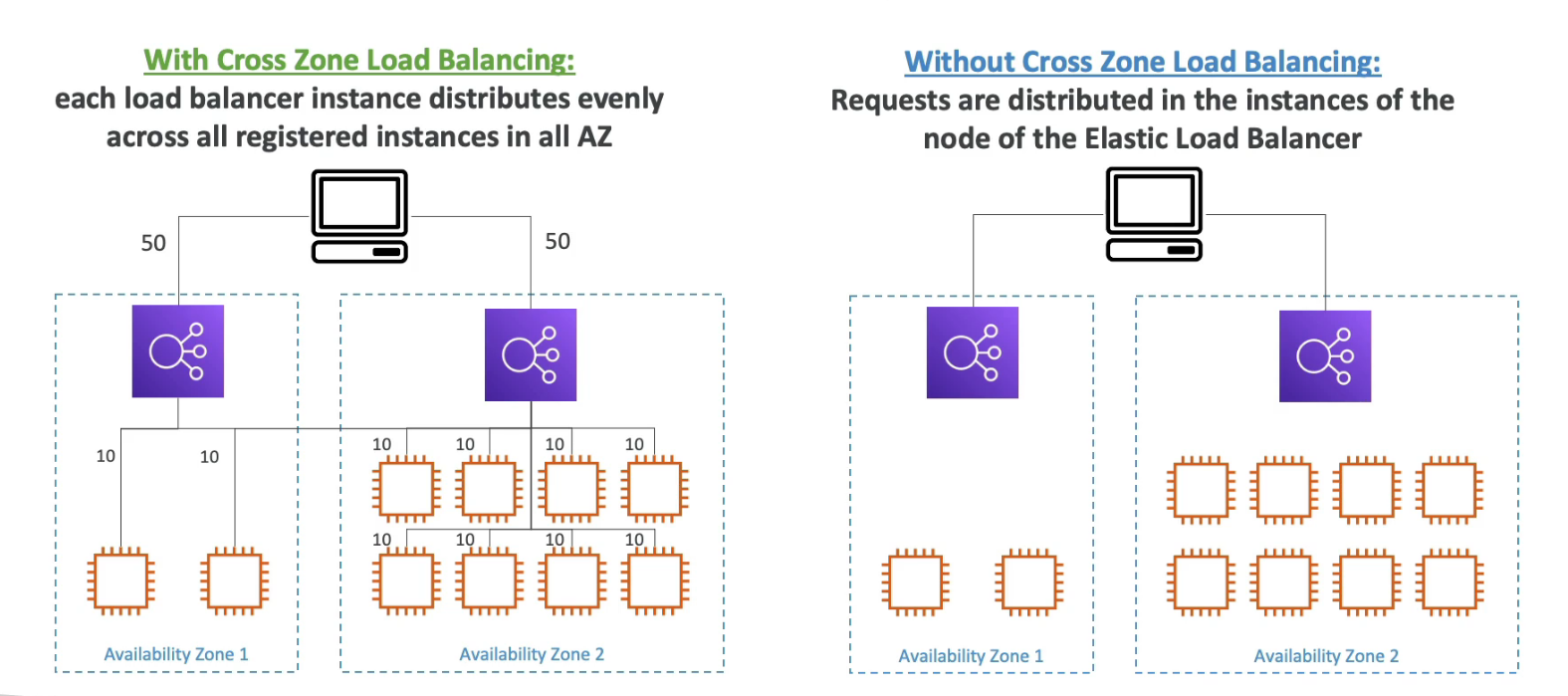
Cross Zone Load Balancing
ALB
Enabled by default (Can disable at the target group)
No charges for inter-AZ data
NLB & GWLB
Disabled by default
Pay charges (&) for inter-AZ data if enabled
CLB
Disabled by default
No charges for inter-AZ data if enabled
Connection Draining / Deregistration Delay
Time to complete "in-flight requests" while the instance is de-registering or unhealthy
Stops sending new requests to the EC2 instance which is de-registering