Network
VPC
EIP
- Elastic IP
- Default 5 EIP per account
ENI
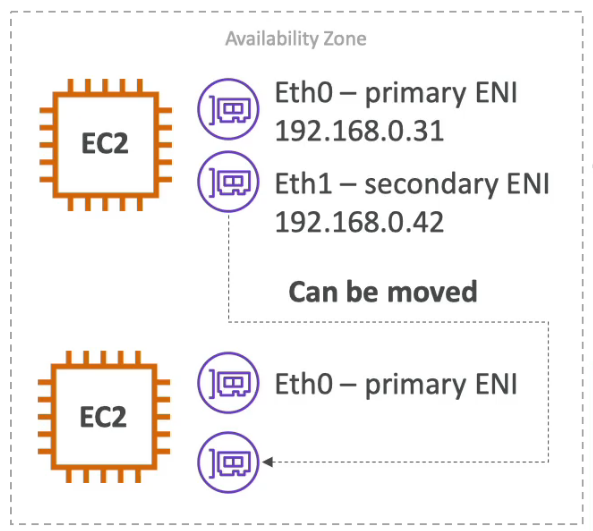
- Elastic Network Interface - Logical component in a VPC that represents a virtual network card
- Attributes
- Primary private IPv4, one or more secondary IPv4
- One EIP per private IPv4
- One Public IPv4
- One or more security group
- A MAC address
- Can create ENI independently and attach them on the fly (move) on EC2 instances for failover
- Bound to a specific AZ
Route 53
- Route 53 is fully managed and Authoritative DNS (Domain Name System)
- Authoritative is the customer can update the DNS records
- Route 53 is also a Domain Registrar
- 100% SLA
- $0.50 per month per hosted zone
- Why 53? It's a reference to the traditional DNS port
- Features
- Health check
- 15 global health checkers
- threshold 3 (default)
- interval 30 sec (can set to 10 sec - higher cost)
- Support protocol HTTP, HTTPS, and TCP
- If >18% of Health Checkers report the endpoint is healthy, Route 53 considers it Healthy. Otherwise, It's Unhealthy
- Health check pass only for 2xx or 3xx status code
- Can be set up to pass or fail based on the text in the first 5120 bytes of the response
- Need to allow traffic from the health checker from the firewall
- Calculated Health Checks: combine the results of multiple Health checks into a single Health Check, Can use AND, OR, or NOT, and have up to 256 Child Health Checks
- For Private Hosted Zone you can set up CloudWatch Metric and associate a CloudWatch Alarm to use with Health Checker
- Alias
- point a hostname to an AWS resource (work with root domain)
- Native health check
- Can't set TTL
- Target: LB, CF, API GW, Beanstalk, S3 website, VPC Interface Endpoint, Global Accelerator, and R53 record in the same zone (not support EC2 DNS name)
- Free
- Routing Policy
- Simple
- Route traffic to a single resource
- Can specify multiple values in the same record (Chosen by the client)
- Can't be associated with health check
- Weighted
- Control the % of the requests that go to each specific resource
- DNS records must have the same name and type
- Can be associated with health check
- Assign 0 to stop the traffic
- If all records are 0 then all records will be returned equally
- Latency based
- Redirect based on the latency close to the user
- Can be associated with health check
- Has a failover capability
- Failover (Active-Passive)
- Geolocation (based on user)
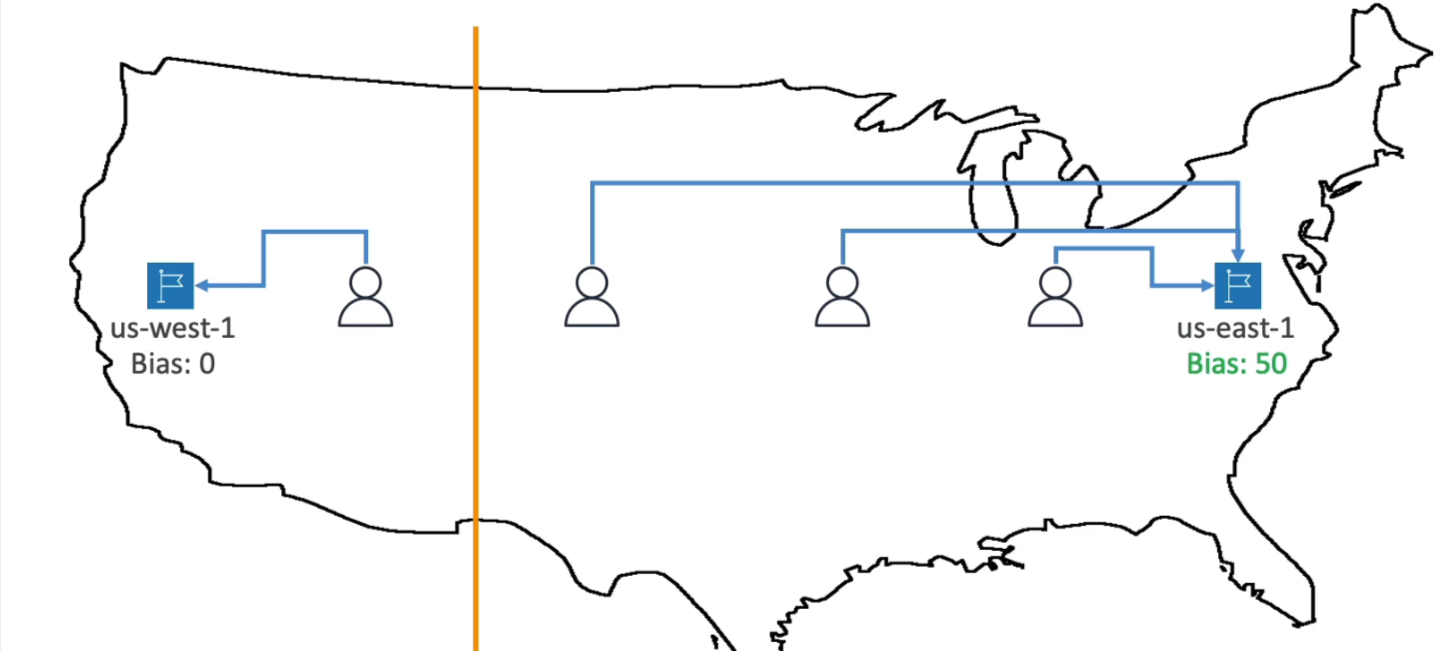
- Geoproximity (based on user and resource, using Route 53 Traffic Flow feature)
- IP-based (based on client IP)
- Muti-Value Answer
- Routing traffic to multiple resources
- Up to 8 healthy records are returned for each Multi-Value query
- Simple
- Health check
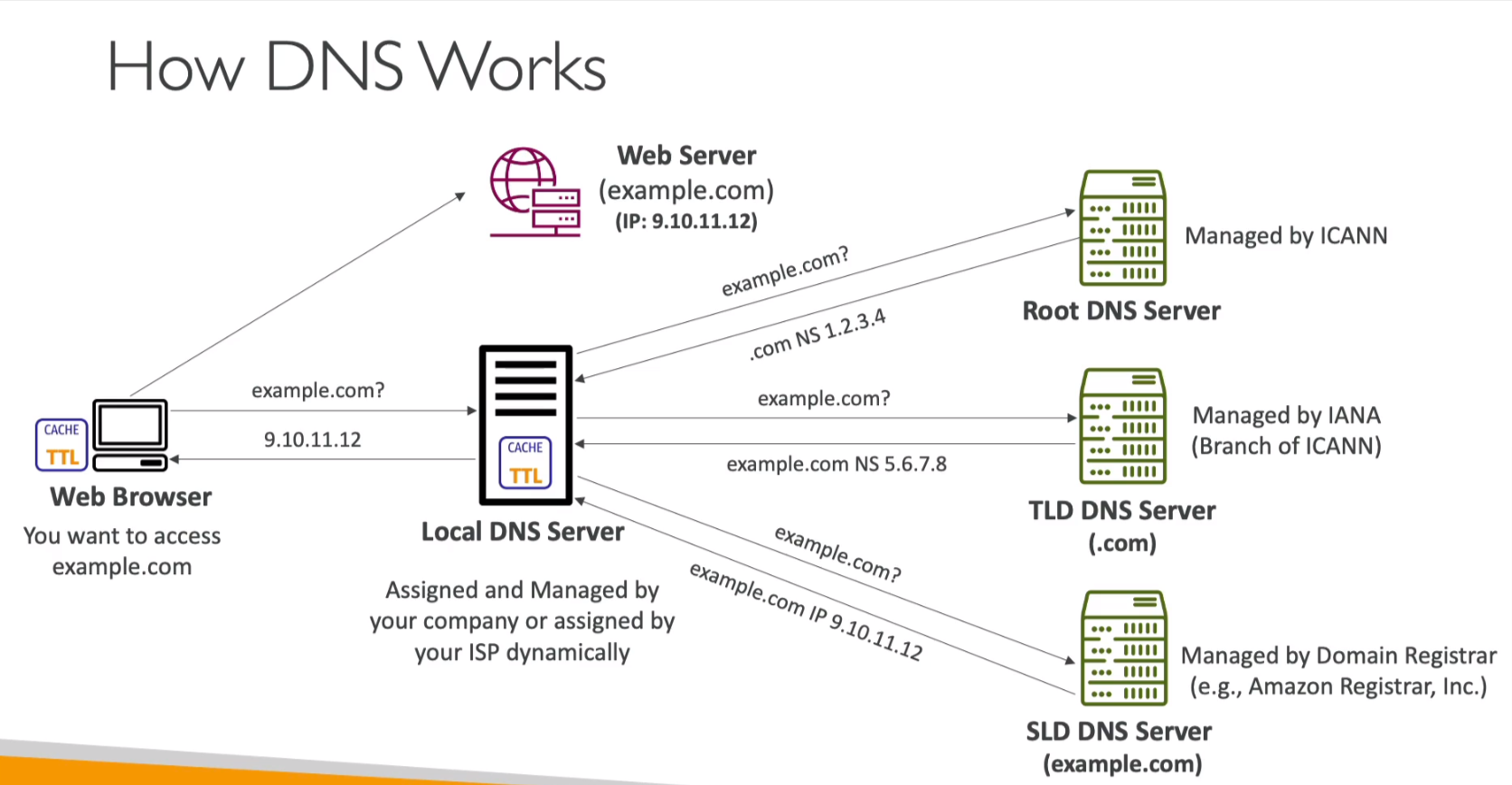
How DNS work
- Zone File container DNS records
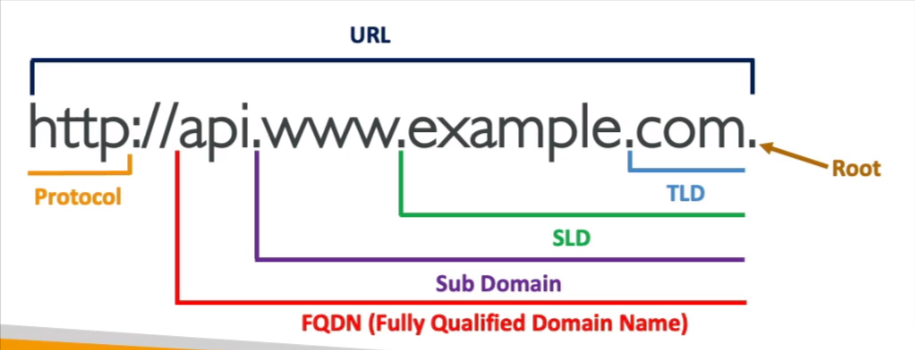
- TLD (Top Level Domain) eg. com, us, in, gov, org
- Second Level Domain (SLD) eg. amazon.com, google.com
- Record container
- Domain/Subdomain
- Record Type
- Value
- TTL (Time to live)
CloudFront
- CDN to improves read performance, content is cached at the edge
- 216 Point of Presence globally (edge locations)
- DDoS protection, Integration with Shield, AWS Web Application Firewall
- Origins
- S3 Bucket
- For distributing and caching files at the edge
- Enhanced security with CloudFront Origin Access Control (OAC)
- OAC is replacing Origin Access Identity (OAI)
- CloudFront can be used as an ingress (to upload files to S3)
- Custom Origin (HTTP)
- ALB, EC2, S3 Website, and Any HTTP backend
- The endpoint must be public
- S3 Bucket
- Geo Restriction
- Can set
AllowlistorBlocklistby the countries - The
Countryis determined using a 3rd party Geo-IP database
- Can set
- Price Classes
- Reduce the number of edge locations for cost reduction
- Three price classes
- All - all regions for best performance
- 200 - Most regions, but excludes the most expensive regions
- 100 - Only the least expensive regions
- Cache Invalidations
- In case you update the backend origin, CloudFront doesn't know about it and will only get the refreshed content after the TTL has expired
- You can force an entire or partial cache refresh (thus bypassing the TTL) by performing a
CloudFront Invalidationto all files (*) or a special path (/images/*)
Global Accelerator
- Unicast IP vs Anycast IP
- Unicast IP - One server holds one IP address
- Anycast IP - All servers hold the same IP address and the client is routed to the nearest one
- Leverage the AWS internal network to route the traffic
- 2 Anycast IP sends traffic directly to edge locations
- The Anycast IP sends traffic directly to edge locations
- The edge locations send the traffic to your application
- Works with Elastic IP, EC2 instances, ALB, NLB, public or private
- Consistent Performance
- Intelligent routing to the lowest latency and fast regional failover
- No issue with the client cache (because the IP doesn't change)
- Health Checks
- failover of less than 1 minute for unhealthy
- Security
- only 2 external IP need to be whitelisted
- DDoS protection by AWS Shield
- Wide range of applications over TCP or UDP such as gaming (UDP), IoT (MQTT), or Voice over IP